
Article
Lesson content
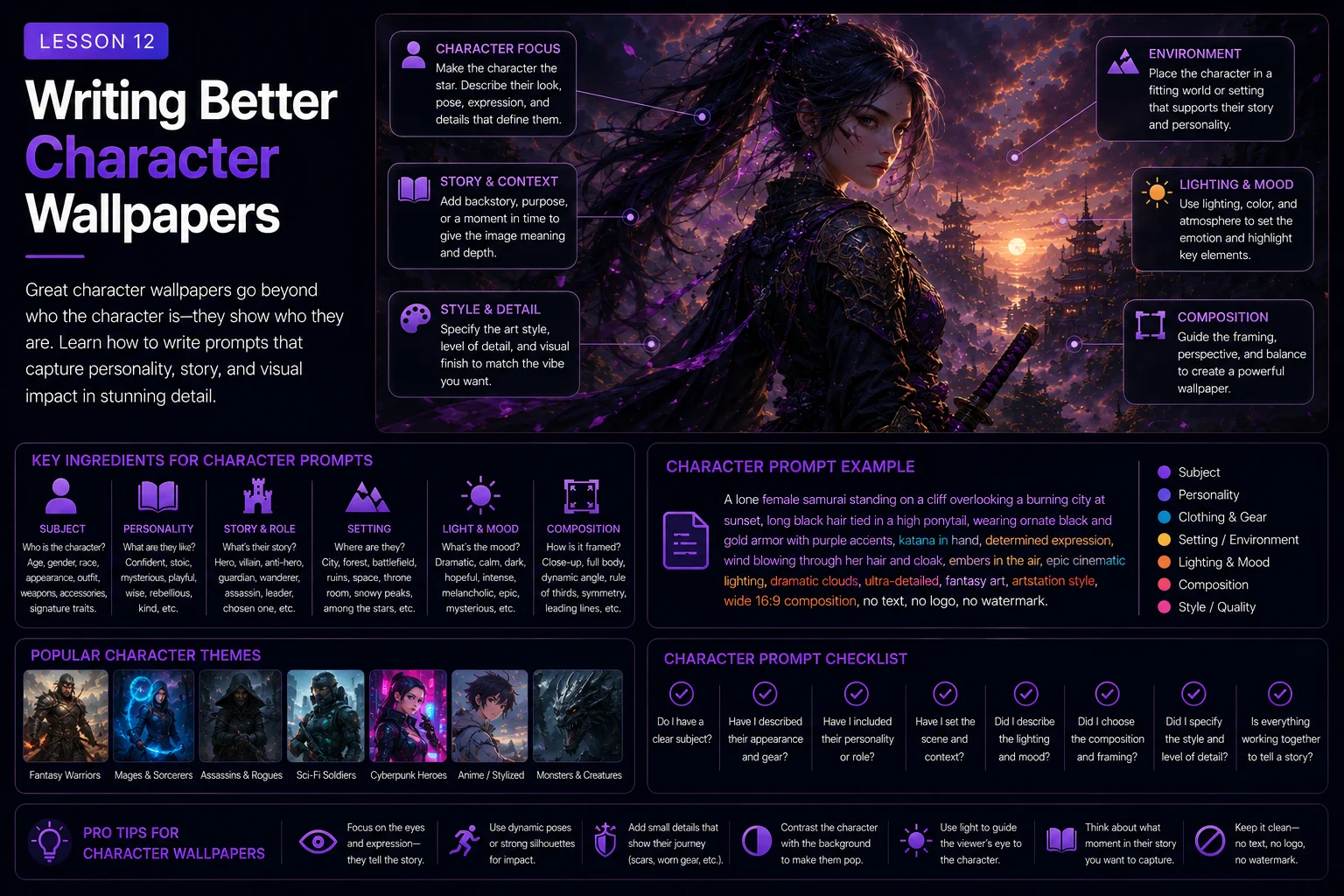
Writing Better Character Wallpapers
Character wallpapers can be powerful, memorable, and highly collectible.
A strong character wallpaper can show a fantasy warrior, sci-fi pilot, cyberpunk explorer, robot, superhero-inspired figure, mascot, animal character, retro game hero, or original digital art portrait. But character prompts also have special challenges.
AI tools often struggle with faces, hands, poses, anatomy, clothing details, weapons, hair, and cropping. A character may look great at first glance, but then you notice extra fingers, distorted eyes, a cut-off head, strange armor, or a background that fights with the subject.
A good character wallpaper prompt needs more control than a simple landscape prompt. It should describe the character clearly, protect the subject from bad cropping, guide the pose, keep the background clean, and make the final image work as a wallpaper.
In this lesson, you will learn how to write better character wallpaper prompts for Skinbase-ready artwork.
Why Character Wallpapers Are Harder
Character images are more sensitive than landscapes.
Small mistakes are easier to notice on people, animals, robots, and humanoid figures. A mountain can be slightly strange and still look beautiful. A face with uneven eyes or a hand with seven fingers is much harder to ignore.
Common character wallpaper problems include:
Cropped heads
Cut-off hands or feet
Extra fingers
Extra limbs
Distorted faces
Strange eyes
Broken armor
Messy clothing
Weapons leaving the frame
Hair blending into the background
Subject too close to the edge
Background too busy
A strong prompt does not fix every problem, but it can reduce many of them.
Start With a Clear Character Type
Before writing a full prompt, decide what kind of character you want.
Examples:
fantasy warrior
sci-fi pilot
cyberpunk detective
robot explorer
magical forest guardian
retro pixel-art hero
armored princess
space ranger
gothic knight
steampunk inventor
anime-inspired adventurer
animal mascot
Weak idea:
a cool character
Better idea:
a heroic fantasy warrior in silver armor
Even better:
a heroic fantasy warrior in silver armor with a red cape, standing on a rocky mountain pass
The clearer the character type, the easier it is for the AI to create a focused image.
Describe the Character Without Overloading It
Character details are useful, but too many details can create visual confusion.
Weak prompt:
A warrior with silver armor, red cape, blue eyes, scars, tattoos, golden belt, leather boots, glowing sword, shield, helmet, wings, fire aura, ice aura, crown, necklace, rings, shoulder spikes, dragon mask, and floating crystals.
This gives the AI too many details to solve at once.
Cleaner prompt:
A heroic fantasy warrior in silver armor with a red cape, holding a glowing sword, standing on a rocky mountain pass at sunset.
This version keeps the strongest visual ideas.
A useful rule:
Choose three to five important character details, not fifteen.
Good character details can describe:
Role
Outfit
Main color
Pose
Expression
Weapon or tool
Silhouette
Material
Mood
Background relationship
Example:
A calm sci-fi pilot in a white flight suit, standing beside a small starfighter, helmet under one arm, warm sunset light.
This is clear, visual, and not overloaded.
Control the Pose
The pose affects the whole feeling of the wallpaper.
Useful pose phrases:
standing confidently
walking into the distance
arms crossed
holding a glowing sword
looking toward the horizon
kneeling beside a campfire
standing in a heroic pose
leaning against a futuristic vehicle
facing away from the viewer
looking over one shoulder
Weak prompt:
A fantasy character.
Better prompt:
A fantasy warrior standing confidently on a rocky mountain pass, holding a glowing sword, cape moving in the wind.
The pose makes the character feel more intentional.
For wallpapers, avoid poses that are too complex unless you really need them. Complex action poses can create more anatomy problems.
Beginner-friendly poses include:
standing
walking
looking into the distance
holding one object
sitting calmly
standing in silhouette
These are easier for AI tools to render cleanly.
Protect the Character From Bad Cropping
Cropping is one of the biggest problems in character wallpapers.
AI tools may cut off heads, hands, feet, weapons, wings, or hair. This often happens when the character is too large in the frame.
Useful cropping control phrases:
full body visible
complete character inside the frame
safe margins around the character
head and shoulders fully visible
no cropped head
no cut-off hands
no cut-off feet
no cropped weapon
subject not touching the edges
full silhouette visible
Example:
A heroic fantasy warrior standing on a rocky mountain pass, full body visible with safe margins, wide 16:9 desktop wallpaper composition, subject placed on the right third, no cropped head, no cut-off hands, no text, no watermark.
If you want a portrait, use different instructions:
centered portrait, head and shoulders fully visible, clean background, face clearly visible, no cropped head.
Do not leave cropping to chance.
Choose the Right Framing
Framing means how close the viewer is to the character.
Common character framing options:
close-up portrait
head-and-shoulders portrait
half-body view
full-body view
distant silhouette
over-the-shoulder view
wide environmental character shot
For wallpapers, full-body and environmental shots often work well because they leave space around the character.
Example:
A lone sci-fi explorer standing on a desert planet, full-body view, wide environmental shot, character placed on the left third, large alien sky on the right, cinematic sci-fi atmosphere.
This gives the image space and makes it wallpaper-friendly.
Close-up portraits can also work, but they need clean backgrounds and careful cropping.
Example:
A calm fantasy queen portrait, head and shoulders fully visible, centered composition, soft magical light, clean dark background, no cropped head, no distorted face, no text, no watermark.
Choose framing based on the final use.
Place the Character Intentionally
Subject placement is very important in wallpaper design.
Useful placement phrases:
character placed on the right third
character placed on the left third
centered character
character in the lower-right third
distant character near the horizon
clean space on the left
large open background behind the character
strong silhouette against the sky
Example:
A cyberpunk detective standing on a rooftop at night, character placed on the right third, large neon city skyline on the left, wide 16:9 desktop wallpaper, blue and pink lighting, no readable text, no watermark.
This creates a more usable desktop wallpaper than placing detail everywhere.
Keep the Background Clean
A character wallpaper needs a background, but the background should not compete with the character.
Good background types:
misty mountains
clean sky
distant city
soft forest
simple studio gradient
blurred lights
large moon
empty desert
quiet ruins
abstract glow
Weak background:
A character standing in front of a busy city full of signs, crowds, vehicles, wires, lights, explosions, holograms, and random objects everywhere.
Better background:
A character standing on a rooftop above a distant neon city, soft blurred lights, clean dark sky, cinematic atmosphere.
Useful background phrases:
clean background
simple atmospheric background
soft blurred background
distant city lights
uncluttered environment
calm negative space
background does not compete with the subject
clear silhouette against the background
The character should remain the main focus.
Use Silhouette for Readability
A strong silhouette makes a character easy to recognize.
Silhouette means the outer shape of the character is clear.
Useful silhouette phrases:
strong readable silhouette
clear character outline
distinct shape against the sky
rim light around the character
simple background behind the subject
full silhouette visible
Example:
A lone knight standing before a glowing portal, strong readable silhouette, soft blue rim light, clean dark ruins in the background, wide 16:9 fantasy wallpaper, no text, no watermark.
Silhouette is especially useful for:
warriors
robots
animals
cloaked figures
astronauts
mechs
retro pixel-art characters
If the silhouette is clear, the wallpaper will read better in both full size and thumbnail view.
Guide Face and Anatomy Quality
Character prompts should include restrictions for common anatomy problems.
Useful restrictions:
no distorted face
no uneven eyes
no extra limbs
no extra fingers
no broken hands
no fused fingers
no malformed anatomy
no cropped head
no cut-off limbs
no blurry face
For beginner prompts, you can add a simple restriction group:
no distorted face, no extra limbs, no broken hands, no cropped head
Example:
A sci-fi pilot standing beside a starfighter, full body visible, confident pose, clean cinematic background, no distorted face, no extra limbs, no broken hands, no cropped head, no text, no watermark.
Restrictions do not guarantee perfect anatomy, but they can help.
Character Lighting
Lighting helps shape the character and separate it from the background.
Useful character lighting phrases:
cinematic rim lighting
soft portrait lighting
dramatic sunset backlight
blue neon side light
warm window light
moonlit silhouette
glowing sword as light source
soft diffused light on the face
subtle highlights on armor
Example:
A heroic fantasy warrior standing on a mountain ridge, dramatic sunset rim lighting, warm glow on the armor, strong silhouette against the sky, wide 16:9 wallpaper, no text, no watermark.
Lighting can make the character feel heroic, mysterious, calm, futuristic, or dramatic.
For wallpaper use, keep the face or silhouette readable.
Character Color Palettes
A clear color palette makes the character image feel more designed.
Useful character palettes:
Fantasy hero:
silver armor, red cape, warm golden sunset
Sci-fi pilot:
white suit, blue lights, dark navy background
Cyberpunk character:
black coat, neon cyan and magenta lighting
Dark fantasy knight:
black armor, silver highlights, blue-gray fog
Cozy fantasy character:
warm brown clothes, amber light, soft autumn tones
Retro pixel-art hero:
limited 16-color palette, clear contrast, bold silhouette
Example:
A cyberpunk explorer in a dark coat, neon cyan and magenta lighting, wet rooftop background, wide 16:9 wallpaper, clean dark space, no readable text, no watermark.
Color helps the character stand out and supports the mood.
Fantasy Character Wallpaper Example
Basic idea:
A fantasy warrior.
Better prompt:
A heroic fantasy warrior in silver armor with a red cape, standing on a rocky mountain pass, full body visible with safe margins, wide 16:9 desktop wallpaper composition, character placed on the right third, distant kingdom in the background, dramatic sunset rim lighting, cinematic fantasy illustration style, strong readable silhouette, no cropped head, no extra limbs, no broken hands, no text, no watermark.
Why it works:
The character type is clear.
The outfit has a few strong details.
The pose is simple.
The framing protects the full body.
The background supports the character.
The restrictions target common AI problems.
Sci-Fi Character Wallpaper Example
Basic idea:
A sci-fi pilot.
Better prompt:
A confident sci-fi pilot in a white flight suit standing beside a small starfighter on a desert landing platform, full body visible, helmet under one arm, wide 16:9 desktop wallpaper composition, pilot placed on the left third, starfighter in the background, warm sunset lighting, clean cinematic sci-fi style, no cropped head, no distorted face, no extra limbs, no text, no watermark.
Why it works:
The pilot is the main subject.
The starfighter supports the scene.
The pose is readable.
The background is cinematic but not too busy.
The prompt protects the face and body from common issues.
Cyberpunk Character Wallpaper Example
Basic idea:
A cyberpunk character.
Better prompt:
A cyberpunk detective in a dark long coat standing on a rainy rooftop at night, neon blue and pink reflections on wet surfaces, wide 16:9 desktop wallpaper composition, character placed on the right third, large dark city skyline on the left, strong silhouette, cinematic cyberpunk style, no readable text, no random letters, no logos, no distorted face, no watermark.
Why it works:
The role is specific.
The mood is clear.
The neon lighting supports the genre.
The composition leaves usable space.
Restrictions help avoid fake text and logos.
Robot Character Wallpaper Example
Basic idea:
A robot.
Better prompt:
A friendly exploration robot standing on a rocky alien hill, full body visible, round helmet-like head, small glowing blue chest light, wide 16:9 desktop wallpaper composition, robot placed slightly right of center, large alien sky behind it, clean sci-fi concept art style, strong readable silhouette, no cropped limbs, no distorted mechanical parts, no text, no watermark.
Why it works:
The robot design is simple and readable.
The background gives scale.
The full body is protected.
The silhouette is clear.
Animal Character Wallpaper Example
Character wallpapers do not always need to be human. Animals and creatures can work very well.
Basic idea:
A wolf wallpaper.
Better prompt:
A majestic white wolf standing on a snowy ridge under a full moon, full body visible with safe margins, wide 16:9 desktop wallpaper composition, wolf placed slightly right of center, large moonlit sky on the left, calm winter atmosphere, soft blue moonlight, no cropped ears, no cut-off paws, no distorted anatomy, no text, no watermark.
Why it works:
The animal is the clear subject.
The pose is simple.
The background supports the mood.
The prompt protects ears, paws, and body from cropping.
Retro and Pixel-Art Character Wallpaper Example
Pixel-art characters need clean shapes and strong silhouettes.
Basic idea:
A pixel art hero.
Better prompt:
A retro 16-bit pixel art space hero standing on an alien platform, full body visible, strong readable silhouette, limited color palette, crisp pixel edges, wide 16:9 wallpaper composition, large starfield background, nostalgic sci-fi mood, no text, no watermark.
Why it works:
The style is clear.
The character shape is readable.
The palette is controlled.
The background is simple enough for pixel art.
Common Character Prompt Mistakes
Mistake 1: No Clear Character Type
Weak:
A cool person wallpaper.
Better:
A cyberpunk detective in a dark coat standing on a rainy rooftop at night.
Mistake 2: Too Many Outfit Details
Weak:
A warrior with armor, cape, crown, wings, mask, necklace, gloves, tattoos, spikes, shield, sword, axe, helmet, fire, ice, crystals, and glowing eyes.
Better:
A fantasy warrior in silver armor with a red cape, holding a glowing sword.
Mistake 3: No Cropping Control
Weak:
A fantasy queen portrait.
Better:
A fantasy queen portrait, head and shoulders fully visible, centered composition, clean dark background, no cropped head, no distorted face, no text, no watermark.
Mistake 4: Busy Background
Weak:
A sci-fi pilot in front of a huge busy city full of signs, vehicles, lights, holograms, crowds, explosions, and spaceships.
Better:
A sci-fi pilot standing beside a starfighter, distant city lights in the background, clean cinematic sky, wide 16:9 wallpaper, no text, no watermark.
Mistake 5: Complex Action Pose Too Early
Weak:
A warrior jumping, spinning, holding two swords, fighting three monsters, cape flying, fire everywhere.
Better:
A warrior standing in a heroic pose on a mountain pass, holding one glowing sword, dramatic sunset light.
Simple poses often produce cleaner results.
Before and After Example
Basic prompt:
A fantasy character wallpaper.
Improved prompt:
A heroic fantasy warrior in silver armor with a red cape, standing on a rocky mountain pass, full body visible with safe margins, wide 16:9 desktop wallpaper composition, character placed on the right third, distant kingdom in the background, dramatic sunset rim lighting, cinematic fantasy illustration style, strong readable silhouette, no cropped head, no extra limbs, no broken hands, no distorted face, no text, no logo, no watermark.
The improved prompt adds:
Character type
Outfit details
Pose
Scene
Framing
Placement
Lighting
Style
Anatomy restrictions
Wallpaper restrictions
This makes the result more likely to be clear, polished, and usable.
Beginner Character Prompt Formula
Use this formula when writing character wallpaper prompts:
Character type + key outfit or design details + pose + scene + framing + placement + lighting + style + restrictions
Example:
A confident sci-fi pilot in a white flight suit, helmet under one arm, standing beside a small starfighter on a desert landing platform, full body visible, wide 16:9 desktop wallpaper composition, pilot placed on the left third, warm sunset lighting, clean cinematic sci-fi style, no cropped head, no distorted face, no extra limbs, no text, no watermark.
This formula helps you control the character while keeping the wallpaper clean.
Quick Character Prompt Starters
Use these starters when you need ideas.
Fantasy warrior:
A heroic fantasy warrior in silver armor with a red cape, standing on a mountain pass, full body visible, wide 16:9 desktop wallpaper, dramatic sunset rim lighting, no cropped head, no extra limbs, no watermark.
Sci-fi pilot:
A confident sci-fi pilot standing beside a small starfighter, helmet under one arm, full body visible, wide 16:9 wallpaper, warm cinematic lighting, no distorted face, no text, no watermark.
Cyberpunk detective:
A cyberpunk detective in a dark coat standing on a rainy rooftop, neon blue and pink reflections, character placed on the right third, wide 16:9 desktop wallpaper, no readable text, no watermark.
Robot explorer:
A friendly exploration robot standing on a rocky alien hill, full body visible, large alien sky behind it, clean sci-fi concept art style, wide 16:9 wallpaper, no cropped limbs, no watermark.
White wolf:
A majestic white wolf standing on a snowy ridge under a full moon, full body visible, wide 16:9 desktop wallpaper, soft blue moonlight, no cropped ears, no cut-off paws, no watermark.
Retro pixel hero:
A retro 16-bit pixel art hero standing on an alien platform, strong readable silhouette, limited color palette, crisp pixel edges, wide 16:9 wallpaper, no text, no watermark.
Skinbase Creator Tip
Character wallpapers are easier to present on Skinbase when the character idea is clear.
Useful character tags might include:
character
fantasy-warrior
sci-fi
cyberpunk
robot
portrait
wolf
knight
pixel-art
digital-art
Choose tags that describe what is actually visible in the image.
If the image shows a sci-fi pilot beside a starfighter, tags like sci-fi, pilot, starfighter, and character are useful. If the image is a fantasy knight, tags like fantasy, knight, armor, and warrior are more helpful.
Clear prompts lead to clearer titles, tags, and better Skinbase uploads.
Practice Exercise
Start with this simple idea:
A fantasy warrior.
Now improve it step by step.
Add design detail:
A fantasy warrior in silver armor with a red cape.
Add pose and scene:
A fantasy warrior in silver armor with a red cape, standing on a rocky mountain pass.
Add framing and placement:
A fantasy warrior in silver armor with a red cape, standing on a rocky mountain pass, full body visible, wide 16:9 desktop wallpaper composition, character placed on the right third.
Add lighting and style:
A fantasy warrior in silver armor with a red cape, standing on a rocky mountain pass, full body visible, wide 16:9 desktop wallpaper composition, character placed on the right third, dramatic sunset rim lighting, cinematic fantasy illustration style.
Final prompt:
A heroic fantasy warrior in silver armor with a red cape, standing on a rocky mountain pass, full body visible with safe margins, wide 16:9 desktop wallpaper composition, character placed on the right third, distant kingdom in the background, dramatic sunset rim lighting, cinematic fantasy illustration style, strong readable silhouette, no cropped head, no extra limbs, no broken hands, no distorted face, no text, no logo, no watermark.
Now create your own character wallpaper prompt.
Try one of these:
sci-fi pilot
cyberpunk detective
fantasy queen
robot explorer
white wolf
gothic knight
retro pixel-art hero
magical forest guardian
Keep the pose simple, the background clean, and the character fully readable.
Key Takeaways
Character wallpapers need careful prompt control.
To write stronger character prompts:
Start with a clear character type.
Add only the most important design details.
Use simple, readable poses.
Control framing and placement.
Protect the subject from bad cropping.
Keep the background clean.
Use lighting to separate the character from the scene.
Add restrictions for faces, hands, limbs, and anatomy.
Make sure the image still works as a wallpaper.
A great character wallpaper is not only a cool character. It is a well-composed screen background with a clear subject, readable silhouette, clean space, and fewer AI artifacts.
In the next lesson, you will learn how to create retro, pixel art, and Amiga-inspired wallpaper prompts with stronger constraints, cleaner shapes, and more authentic nostalgic style.
Course navigation
Continue this course
Previous lesson
Wallpaper Prompt Engineering for Skinbase Creators · Lesson 11
Writing Better Nature and Landscape Prompts
Learn how to create peaceful, atmospheric, and screen-friendly AI nature wallpapers with stronger landscape prompts.
Next lesson
Wallpaper Prompt Engineering for Skinbase Creators · Lesson 13
Retro, Pixel Art, and Amiga-Inspired Wallpaper Prompts
Learn how to write clearer retro, pixel art, and Amiga-inspired wallpaper prompts with stronger constraints, palettes, and readable composition.