
Article
Lesson content
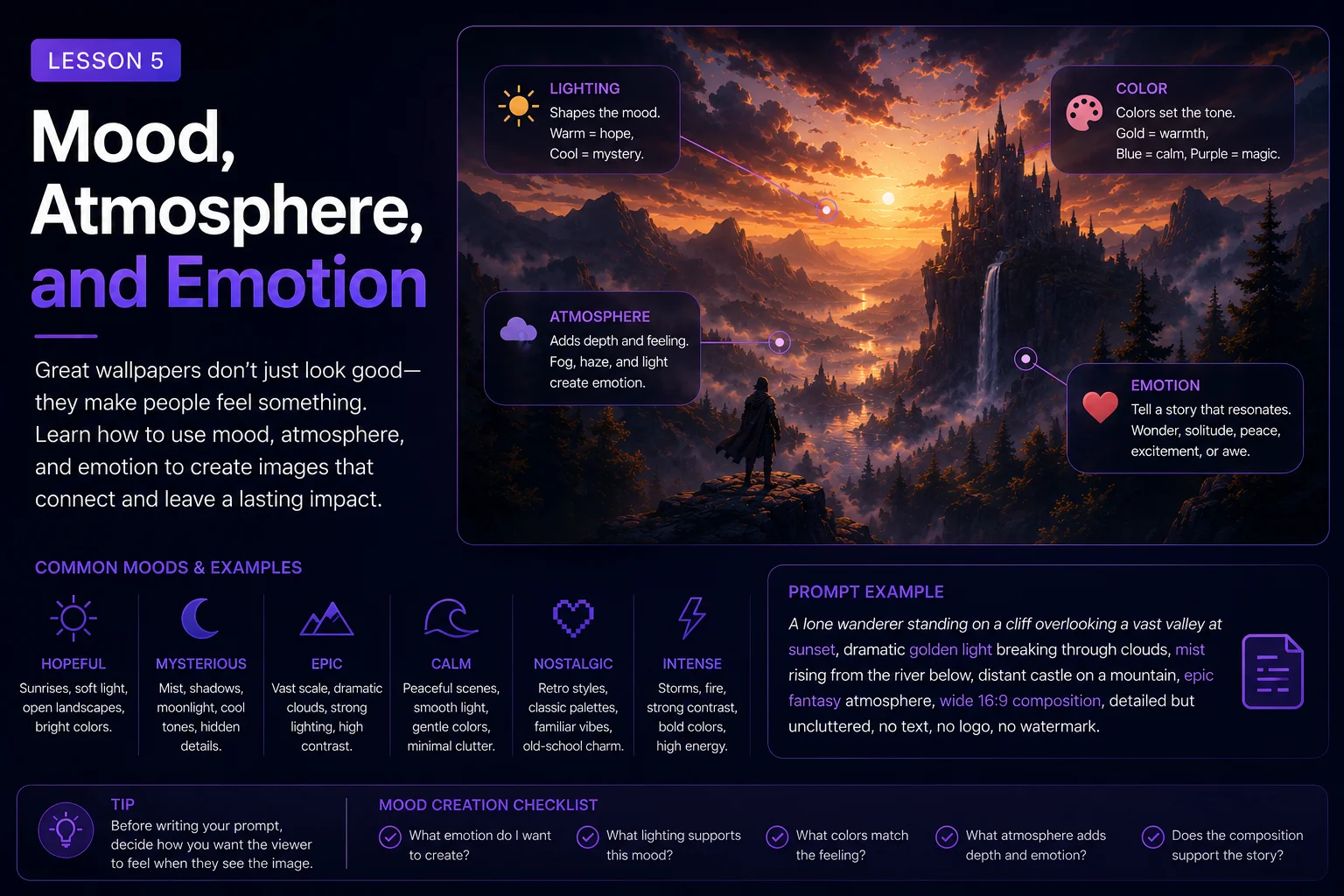
Mood, Atmosphere, and Emotion
A good wallpaper prompt does not only describe what appears in the image. It also describes how the image should feel.
Two prompts can have the same subject and scene, but create completely different results depending on mood, atmosphere, and emotion.
For example, a forest can feel peaceful, magical, scary, lonely, romantic, mysterious, heroic, or dreamlike. A city can feel futuristic, dangerous, cozy, cinematic, rainy, empty, alive, or nostalgic.
Mood gives your wallpaper emotional direction. Atmosphere gives the image a sense of place and feeling. Emotion helps the viewer connect with the final artwork.
In this lesson, you will learn how to use mood and atmosphere words to make your AI wallpaper prompts stronger, clearer, and more memorable.
What Is Mood?
Mood is the emotional feeling of an image.
It answers the question:
How should this wallpaper feel?
Examples of mood words:
calm
peaceful
epic
mysterious
dark
cozy
hopeful
lonely
magical
dramatic
nostalgic
futuristic
dreamy
heroic
romantic
A simple subject can change completely when you change the mood.
Basic idea:
A castle on a hill.
Peaceful mood:
A peaceful castle on a green hill at sunrise, soft golden light, calm sky, gentle mist, cozy fantasy atmosphere.
Dark mood:
A dark gothic castle on a stormy hill, black clouds, cold moonlight, mysterious and ominous atmosphere.
Epic mood:
A majestic fantasy castle on a mountain peak, dramatic sunrise, glowing clouds, heroic and cinematic atmosphere.
The subject is similar, but the mood changes the entire image.
What Is Atmosphere?
Atmosphere is the feeling created by the environment, lighting, weather, color, and space.
It answers the question:
What kind of world does this image live in?
Atmosphere can come from:
Fog
Rain
Snow
Mist
Dust
Smoke
Moonlight
Sunrise
Neon glow
Storm clouds
Soft shadows
Distant lights
Color palette
Open sky
Reflections
Example:
A lone lighthouse on a rocky coast.
With atmosphere:
A lone lighthouse on a rocky coast, thick ocean fog, soft blue-gray morning light, waves crashing below, quiet melancholic atmosphere, wide 16:9 wallpaper composition.
The atmosphere makes the scene feel alive.
Why Emotion Matters in Wallpaper Prompts
People often choose wallpapers because of how they make them feel.
Some users want calm wallpapers for focus. Some want dramatic fantasy images. Some want nostalgic retro scenes. Some want dark sci-fi worlds. Some want cozy, hopeful, or dreamy images.
A technically good image may still feel forgettable if it has no emotional direction.
A stronger prompt gives the AI emotional guidance.
Weak prompt:
A mountain lake wallpaper.
Better prompt:
A peaceful mountain lake at sunrise, soft mist over the water, warm golden light, calm reflective mood, wide 16:9 desktop wallpaper, clean sky and smooth water surface, realistic digital painting style, no text, no watermark.
The better version does not only describe the lake. It describes the feeling.
Mood Should Match the Subject
Mood works best when it supports the subject and scene.
A cozy mood fits well with:
cottages
warm rooms
small villages
glowing windows
autumn forests
soft rain
tea houses
fireplaces
An epic mood fits well with:
castles
dragons
mountains
battles
heroes
giant structures
dramatic skies
A mysterious mood fits well with:
forests
ruins
fog
old temples
hidden doors
moonlight
abandoned cities
A futuristic mood fits well with:
neon cities
robots
spaceships
holograms
clean architecture
alien planets
Example:
A cozy cyberpunk battlefield with cute dragons and a gothic ocean temple.
This mixes too many emotional directions. It may produce a confusing image.
Better:
A quiet cyberpunk alley at night, soft neon reflections on wet pavement, warm window lights, cozy futuristic mood, wide 16:9 wallpaper composition, no text, no watermark.
The mood and scene now work together.
Use Mood Words With Visual Details
Mood words are useful, but they become stronger when paired with visual details.
Weak:
A mysterious forest.
Better:
A mysterious forest with thick blue fog, twisted ancient trees, faint moonlight, and a narrow path disappearing into the shadows.
The second version shows the mystery instead of only naming it.
Examples:
Calm
soft mist, still water, gentle sunrise, smooth clouds, muted colors
Epic
huge scale, dramatic clouds, glowing horizon, towering mountains, strong silhouettes
Cozy
warm window light, soft rain, wooden textures, glowing fireplace, small village street
Dark
cold moonlight, deep shadows, storm clouds, black stone, dim blue highlights
Dreamy
soft glow, pastel colors, floating particles, gentle haze, surreal light
Futuristic
neon reflections, clean architecture, holographic lights, metallic surfaces, glowing panels
Pairing mood with visual details helps the AI understand what you mean.
Color Helps Control Emotion
Color has a strong effect on mood.
Warm colors often feel:
cozy
hopeful
romantic
nostalgic
peaceful
magical
Cool colors often feel:
calm
mysterious
futuristic
lonely
quiet
cinematic
Dark colors often feel:
dramatic
serious
gothic
dangerous
powerful
Bright colors often feel:
playful
energetic
cheerful
dreamlike
Useful color phrases:
warm golden light
soft orange and violet sunset
calm blue and teal palette
dark blue-gray atmosphere
neon pink and cyan glow
muted earthy tones
pastel dream colors
limited color palette
high contrast light and shadow
Example:
A peaceful ocean sunset, wide 16:9 wallpaper, soft orange and violet sky, gentle waves, clean horizon, calm reflective mood, no text, no watermark.
The colors support the emotion.
Weather Adds Atmosphere
Weather is one of the easiest ways to add atmosphere to a wallpaper.
Rain can feel:
cinematic
sad
romantic
futuristic
dramatic
Fog can feel:
mysterious
calm
magical
lonely
soft
Snow can feel:
quiet
peaceful
cold
isolated
magical
Storms can feel:
epic
dangerous
powerful
dark
dramatic
Sunrise can feel:
hopeful
peaceful
fresh
warm
inspiring
Example:
A lonely samurai standing on a hill in soft rain, distant city lights below, cool blue atmosphere, quiet cinematic mood, wide 16:9 wallpaper composition, no text, no watermark.
Weather gives the image a stronger emotional identity.
Lighting Shapes the Feeling
Lighting is one of the strongest tools for mood.
Different lighting phrases create different emotions:
soft sunrise lighting: peaceful and hopeful
golden sunset lighting: warm and nostalgic
moonlight: mysterious and calm
neon lighting: futuristic and energetic
candlelight: cozy and intimate
storm lighting: dramatic and powerful
rim lighting: cinematic and heroic
diffused light: soft and gentle
harsh shadows: dark and intense
Basic prompt:
A fantasy warrior on a mountain.
With emotional lighting:
A fantasy warrior standing on a mountain ridge, dramatic sunset rim lighting, glowing clouds behind the silhouette, heroic cinematic mood, wide 16:9 wallpaper composition, no text, no watermark.
Lighting helps turn a simple idea into a memorable wallpaper.
Avoid Too Many Mood Words
Adding too many mood words can confuse the prompt.
Weak:
A peaceful, terrifying, cozy, epic, romantic, dark, cheerful, mysterious, futuristic forest.
This gives the AI mixed emotional signals.
Better:
A mysterious forest at night, thick blue fog, faint moonlight, ancient trees, quiet magical atmosphere.
Choose one main mood and maybe one supporting mood.
Good combinations:
calm and magical
dark and mysterious
epic and heroic
cozy and nostalgic
futuristic and cinematic
lonely and peaceful
dreamy and surreal
Bad combinations usually happen when the moods fight each other.
Mood Examples by Wallpaper Genre
Fantasy Wallpaper
A glowing fantasy castle above a misty valley, soft golden sunrise, calm magical atmosphere, wide 16:9 desktop wallpaper, large open sky, cinematic fantasy digital painting, no text, no watermark.
Mood: calm, magical, hopeful
Sci-Fi Wallpaper
A futuristic city skyline at night, neon blue and violet lights reflecting on wet rooftops, distant flying vehicles, cinematic cyberpunk atmosphere, wide 16:9 wallpaper, clean dark sky, no text, no logo, no watermark.
Mood: futuristic, cinematic, moody
Nature Wallpaper
A quiet mountain lake at dawn, soft mist over the water, pine trees reflected in the lake, gentle golden light, peaceful natural atmosphere, wide 16:9 desktop wallpaper, no text, no watermark.
Mood: peaceful, calm, fresh
Dark Fantasy Wallpaper
A ruined gothic cathedral in a black forest, cold moonlight, drifting fog, broken stone arches, dark mysterious atmosphere, wide 16:9 wallpaper composition, no text, no watermark.
Mood: dark, mysterious, gothic
Retro Pixel-Art Wallpaper
A retro 16-bit pixel art sunset over an alien ocean, limited color palette, glowing purple sky, small spaceship silhouette, nostalgic sci-fi mood, wide 16:9 wallpaper, crisp pixel edges, no text, no watermark.
Mood: nostalgic, sci-fi, calm
Before and After Example
Basic prompt:
A forest wallpaper.
This is too general. It does not tell the AI how the forest should feel.
Improved calm version:
A peaceful forest path at sunrise, soft golden light through tall trees, gentle mist, calm natural atmosphere, wide 16:9 desktop wallpaper, clean open space in the center, realistic digital painting, no text, no watermark.
Improved dark version:
A dark mysterious forest path at night, twisted ancient trees, cold moonlight, thick blue fog, quiet gothic atmosphere, wide 16:9 desktop wallpaper, clean readable composition, no text, no watermark.
Improved magical version:
A magical forest path filled with glowing blue mushrooms, soft fog between ancient trees, dreamy moonlit atmosphere, wide 16:9 desktop wallpaper, clean composition, detailed but uncluttered, no text, no watermark.
The subject is similar, but the emotional direction changes everything.
Beginner Mood Formula
Use this formula when adding emotion to a wallpaper prompt:
Subject + scene + main mood + visual atmosphere + lighting + color palette + wallpaper composition + restrictions
Example:
A lonely lighthouse on a rocky coast, quiet melancholic mood, thick ocean fog, soft blue-gray morning light, muted color palette, wide 16:9 desktop wallpaper composition, lighthouse placed on the right third, clean open sky on the left, no text, no logo, no watermark.
This formula helps you create images that feel intentional instead of random.
Skinbase Creator Tip
When preparing wallpapers for Skinbase, mood can help your artwork stand out.
A good title and tags become easier when the mood is clear.
For example, an image with a lonely spaceship above a blue planet could use tags like:
lonely
sci-fi
space
blue
cinematic
A cozy autumn village could use:
cozy
autumn
village
warm-light
fantasy
Mood helps viewers understand what the artwork offers. It also helps your upload feel more complete.
Practice Exercise
Start with this simple idea:
A castle by a lake.
Now create three mood versions.
Peaceful version:
A peaceful castle beside a quiet mountain lake, soft sunrise light, gentle mist over the water, warm golden atmosphere, wide 16:9 desktop wallpaper, clean sky reflection, no text, no watermark.
Dark version:
A dark gothic castle beside a black lake, cold moonlight, thick fog, storm clouds, mysterious atmosphere, wide 16:9 desktop wallpaper, no text, no watermark.
Epic version:
A majestic fantasy castle beside a mountain lake, dramatic glowing sunrise behind the towers, huge clouds, heroic cinematic atmosphere, wide 16:9 desktop wallpaper, no text, no watermark.
Now choose your own subject and write three different mood versions.
Key Takeaways
Mood, atmosphere, and emotion help your wallpaper prompts feel intentional.
To control them better:
Choose one main mood.
Support the mood with visual details.
Use color, lighting, and weather intentionally.
Avoid conflicting mood words.
Match the mood to the subject and scene.
Use atmosphere to make the image feel alive.
A strong wallpaper is not only clear and well-composed. It also has a feeling.
In the next lesson, you will learn how to guide visual style more precisely, including digital art, fantasy, sci-fi, pixel art, and other creative directions.
Course navigation
Continue this course
Previous lesson
Wallpaper Prompt Engineering for Skinbase Creators · Lesson 04
Controlling Subject and Scene
Learn how to describe the main subject and environment clearly without overloading your AI wallpaper prompt.
Next lesson
Wallpaper Prompt Engineering for Skinbase Creators · Lesson 06
Style Direction: Digital Art, Fantasy, Sci-Fi, Pixel Art, and More
Learn how to guide AI image style clearly for digital art, fantasy, sci-fi, pixel art, retro scenes, and other wallpaper genres.