
Article
Lesson content
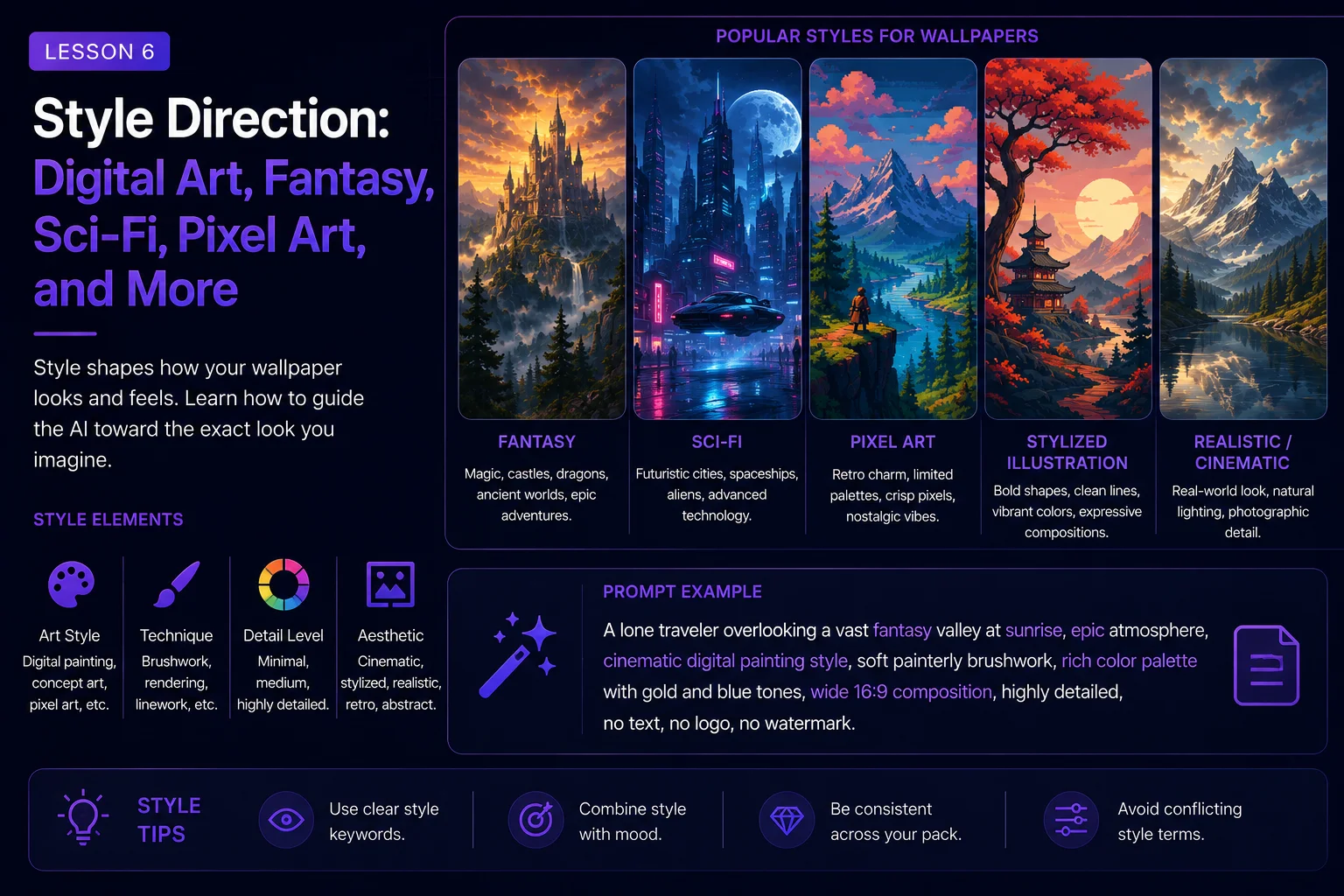
Style Direction: Digital Art, Fantasy, Sci-Fi, Pixel Art, and More
Style direction tells the AI what visual language to use.
The same subject can become a realistic painting, a fantasy illustration, a sci-fi concept image, a retro pixel-art scene, a soft watercolor landscape, or a dark cinematic wallpaper. If you do not guide the style, the AI will choose for you.
A strong style direction helps your wallpaper feel more consistent, polished, and intentional.
In this lesson, you will learn how to describe visual style clearly without mixing too many styles at once.
What Is Style Direction?
Style direction is the part of the prompt that explains how the image should look.
It can describe:
Art medium
Genre
Rendering style
Level of realism
Color treatment
Texture
Era or influence
Visual finish
Technical constraints
Example:
A glowing castle on a mountain ridge.
This describes the subject and scene, but not the style.
Now add style direction:
A glowing castle on a mountain ridge, cinematic fantasy digital painting style.
This gives the AI a clearer visual target.
Another version:
A glowing castle on a mountain ridge, retro 16-bit pixel art style, limited color palette, crisp pixel edges.
The subject is similar, but the result should feel completely different.
Choose One Main Style
A common beginner mistake is adding many styles at once.
Weak style direction:
photorealistic watercolor oil painting anime pixel art 3D render fantasy concept art
This gives the AI mixed signals. It may produce an image that feels confused or inconsistent.
Better style direction:
cinematic fantasy digital painting
Or:
clean sci-fi concept art
Or:
retro 16-bit pixel art wallpaper
Choose one main style first. Then add a few supporting details if needed.
Good structure:
Main style + visual finish + wallpaper composition
Example:
cinematic fantasy digital painting, soft atmospheric lighting, wide 16:9 desktop wallpaper composition
This is clear and easy to follow.
Digital Art Style
Digital art is a flexible style for wallpapers. It can be realistic, painterly, cinematic, stylized, colorful, or minimal.
Useful phrases:
digital painting
realistic digital art
cinematic digital illustration
polished digital artwork
detailed digital landscape
painterly digital style
clean modern digital art
studio-quality digital illustration
Example:
A peaceful mountain lake at sunrise, realistic digital painting style, soft mist over the water, warm golden light, wide 16:9 desktop wallpaper, clean sky reflection, no text, no watermark.
Digital art works well for many Skinbase categories because it can look polished while still feeling creative.
Use it when you want a balanced, flexible, wallpaper-friendly result.
Fantasy Style
Fantasy style is useful for magical worlds, castles, dragons, enchanted forests, ancient ruins, heroes, and mythic landscapes.
Useful phrases:
cinematic fantasy art
epic fantasy illustration
magical fantasy landscape
dark fantasy concept art
cozy fantasy village
heroic fantasy painting
enchanted forest illustration
high fantasy environment art
Example:
A majestic fantasy castle built into a mountain cliff, waterfalls falling into a misty valley, cinematic fantasy art style, soft golden sunrise lighting, wide 16:9 desktop wallpaper, large open sky area, no text, no watermark.
Fantasy style becomes stronger when you include atmosphere, lighting, and scale.
Good fantasy details:
glowing runes
ancient ruins
misty valleys
magical light
floating islands
enchanted forests
distant kingdoms
dramatic skies
Avoid adding too many magical objects at once. A clean fantasy wallpaper usually needs one strong idea and a clear mood.
Sci-Fi Style
Sci-fi style is useful for futuristic cities, spaceships, robots, alien planets, space scenes, cyberpunk streets, and advanced technology.
Useful phrases:
clean sci-fi concept art
cinematic sci-fi environment
futuristic digital illustration
cyberpunk cityscape
hard-surface sci-fi design
space opera concept art
sleek futuristic wallpaper
neon sci-fi atmosphere
Example:
A futuristic city skyline at night, glowing towers and distant flying vehicles, clean sci-fi concept art style, neon blue and violet lighting, wide 16:9 desktop wallpaper, city placed in the lower third, large atmospheric sky above, no text, no logo, no watermark.
Sci-fi style works well when you control shapes, lighting, and color.
Good sci-fi details:
neon reflections
holographic lights
metallic surfaces
glowing panels
distant planets
starfields
clean architecture
sharp silhouettes
For wallpapers, try to keep the design readable. Too many lights, panels, vehicles, and signs can make the image noisy.
Cyberpunk Style
Cyberpunk is a specific type of sci-fi style. It often uses neon lights, rainy streets, crowded cities, dark alleys, glowing signs, and high-tech atmosphere.
Useful phrases:
cyberpunk city at night
neon reflections on wet pavement
rainy futuristic alley
blue and pink neon lighting
dense urban sci-fi atmosphere
cinematic cyberpunk wallpaper
dark city with glowing signs
Example:
A rainy cyberpunk street at night, one lone figure walking in the distance, neon blue and pink reflections on wet pavement, cinematic cyberpunk style, wide 16:9 desktop wallpaper, clean dark space on the left, no readable text, no logos, no watermark.
Cyberpunk images often generate fake text. Use restrictions such as:
no readable text, no random letters, no logos, no watermark
This helps keep the wallpaper cleaner.
Pixel Art Style
Pixel art needs more specific direction than general digital art.
If you simply write “pixel art,” the AI may create a blurry image with pixel-like texture instead of clean pixel art. You need to guide the constraints.
Useful phrases:
retro pixel art
16-bit pixel art style
crisp pixel edges
limited color palette
low-resolution game art aesthetic
classic computer game background
clean readable pixel shapes
no anti-aliased blur
tile-like clarity
Example:
A retro 16-bit pixel art spaceship flying above an alien ocean, limited color palette, crisp pixel edges, wide 16:9 wallpaper composition, large starfield area, planet horizon in the lower third, nostalgic sci-fi mood, no text, no watermark.
Pixel art works best when the subject has a strong silhouette and the scene is not overloaded.
Good pixel-art prompt details:
limited palette
strong silhouette
clean shapes
readable forms
simple background layers
crisp edges
retro game atmosphere
For Skinbase wallpapers, pixel art can be very effective because it feels nostalgic and visually distinct.
Retro Computer and Amiga-Inspired Style
Retro computer style is related to pixel art, but it can include a more specific old-school computer feeling.
Useful phrases:
retro 16-bit computer art style
Amiga-inspired pixel art
classic demo scene atmosphere
limited 32-color palette
crisp low-resolution pixel look
old-school game background
copper gradient sky
nostalgic computer art mood
Example:
A retro 16-bit computer art landscape, glowing sunset over a futuristic ocean, limited 32-color palette, crisp pixel edges, copper gradient sky, wide 16:9 wallpaper composition, nostalgic sci-fi atmosphere, no text, no watermark.
When writing retro prompts, constraints are important. Mention palette, pixel clarity, and simple readable composition.
Avoid asking for too much realism in the same prompt. “Photorealistic Amiga pixel art” can confuse the result.
Photorealistic Style
Photorealistic style tries to look like a real photograph.
Useful phrases:
photorealistic landscape
realistic photography style
cinematic photo-real lighting
natural depth of field
realistic materials
high-detail realistic render
professional landscape photography
realistic atmospheric lighting
Example:
A photorealistic mountain lake at sunrise, soft mist over the water, pine trees reflected in the lake, natural golden light, wide 16:9 desktop wallpaper, clean sky and calm composition, no text, no watermark.
Photorealistic prompts work well for nature, architecture, vehicles, and realistic environments.
Be careful with people and animals. Photorealistic characters can reveal AI mistakes more easily, especially faces, eyes, hands, teeth, and anatomy.
For character images, add restrictions:
no distorted face, no extra fingers, no broken hands, no cropped head
Painterly and Illustration Styles
Painterly styles can feel softer, more artistic, and less literal than photorealism.
Useful phrases:
soft painterly illustration
hand-painted fantasy landscape
painterly digital art
expressive brushwork
gentle illustrated style
storybook illustration
elegant concept painting
atmospheric matte painting
Example:
A peaceful fantasy village in autumn, soft painterly illustration style, warm window lights, falling leaves, gentle evening atmosphere, wide 16:9 desktop wallpaper, clean composition, no text, no watermark.
Painterly styles are useful when you want charm, mood, and atmosphere instead of strict realism.
Minimal and Abstract Styles
Minimal and abstract wallpapers can work very well because they are clean and screen-friendly.
Useful phrases:
minimal abstract wallpaper
smooth gradient background
elegant geometric shapes
soft glowing waves
clean modern design
simple color composition
calm negative space
subtle light patterns
Example:
Smooth abstract waves of blue and violet light flowing across a dark background, minimal modern digital art style, wide 16:9 desktop wallpaper, clean negative space on the left, soft gradients, calm futuristic mood, no text, no logo, no watermark.
Minimal prompts should focus on shape, color, rhythm, and space.
They do not need many objects. The strength comes from balance and simplicity.
3D Render Style
3D render style can create polished objects, environments, toys, futuristic scenes, and stylized characters.
Useful phrases:
stylized 3D render
cinematic 3D environment
polished 3D illustration
realistic 3D materials
soft studio lighting
clean 3D composition
high-quality render
detailed but uncluttered
Example:
A stylized 3D render of a small robot standing on a glowing platform, futuristic city lights in the background, soft blue studio lighting, wide 16:9 desktop wallpaper composition, clean negative space, no text, no logo, no watermark.
3D render prompts work best when you describe materials and lighting clearly.
Useful material words:
matte plastic
brushed metal
glass
polished chrome
soft fabric
glowing panels
ceramic surface
painted resin
Style Should Match the Mood
Style and mood should support each other.
A dark gothic castle works well with:
dark fantasy concept art, cold moonlight, thick fog, muted blue-gray palette
A cozy autumn village works well with:
soft painterly illustration, warm window light, gentle rain, muted orange and brown palette
A futuristic robot works well with:
clean sci-fi concept art, metallic surfaces, neon rim lighting, cool blue palette
A retro spaceship works well with:
16-bit pixel art, limited color palette, crisp pixel edges, nostalgic sci-fi mood
When style and mood match, the image feels intentional.
When they conflict, the image may feel confused.
Avoid Style Overload
Style overload happens when you ask for too many visual styles at once.
Weak prompt:
A realistic anime watercolor oil painting pixel art 3D render of a fantasy city.
This is not clear.
Cleaner version:
A fantasy city at sunrise, cinematic fantasy digital painting style, wide 16:9 desktop wallpaper, warm golden light, detailed but uncluttered, no text, no watermark.
Another cleaner version:
A fantasy city at sunrise, retro 16-bit pixel art style, limited color palette, crisp pixel edges, wide 16:9 wallpaper, no text, no watermark.
Both versions are stronger because each has one main style.
Before and After Example
Basic prompt:
A cool dragon wallpaper.
This gives the AI very little style direction.
Improved fantasy version:
A majestic dragon flying above a misty mountain valley, cinematic fantasy art style, soft golden sunrise lighting, wide 16:9 desktop wallpaper composition, large open sky area, detailed but uncluttered, no text, no watermark.
Improved dark fantasy version:
A black dragon circling above ruined gothic towers, dark fantasy concept art style, cold moonlight, thick fog, storm clouds, wide 16:9 desktop wallpaper, dramatic but clean composition, no text, no watermark.
Improved pixel-art version:
A red dragon flying above a retro pixel-art castle, 16-bit game art style, limited color palette, crisp pixel edges, wide 16:9 wallpaper composition, clean moonlit sky, no text, no watermark.
The subject is similar, but the style direction changes everything.
Beginner Style Formula
Use this formula when adding style direction:
Subject + scene + main style + supporting visual traits + lighting + wallpaper composition + restrictions
Example:
A lonely spaceship flying above a blue alien planet, clean sci-fi concept art style, sharp silhouettes, subtle metallic details, cool blue rim lighting, wide 16:9 desktop wallpaper composition, large dark starfield as negative space, no text, no logo, no watermark.
This gives the AI a focused visual language without overloading it.
Quick Style Phrase Library
Use these as starting points:
Fantasy
cinematic fantasy digital painting, magical atmosphere, detailed but uncluttered
Sci-Fi
clean sci-fi concept art, futuristic shapes, neon rim lighting
Cyberpunk
cinematic cyberpunk cityscape, rainy neon streets, blue and pink reflections
Pixel Art
retro 16-bit pixel art style, limited color palette, crisp pixel edges
Nature
realistic digital landscape painting, soft natural light, calm atmosphere
Dark Fantasy
dark fantasy concept art, cold moonlight, thick fog, gothic mood
Cozy Fantasy
soft painterly illustration, warm window light, gentle magical atmosphere
Abstract
minimal abstract wallpaper, smooth gradients, clean negative space
3D
polished stylized 3D render, soft studio lighting, clean composition
Skinbase Creator Tip
Style direction can help your uploads feel more organized and easier to discover.
A clear style also helps with titles, tags, and categories.
For example, a retro pixel-art image can use tags like:
pixel-art
retro
16-bit
sci-fi
nostalgia
A fantasy digital painting can use:
fantasy
castle
magic
landscape
digital-art
A cyberpunk wallpaper can use:
cyberpunk
neon
city
sci-fi
night
When the style is clear, the artwork is easier to present on Skinbase.
Practice Exercise
Start with this simple idea:
A castle above a valley.
Now create three style versions.
Fantasy digital painting:
A castle above a misty valley, cinematic fantasy digital painting style, soft golden sunrise lighting, wide 16:9 desktop wallpaper, large open sky, detailed but uncluttered, no text, no watermark.
Dark gothic style:
A dark castle above a foggy valley, gothic fantasy concept art style, cold moonlight, storm clouds, muted blue-gray palette, wide 16:9 desktop wallpaper, no text, no watermark.
Retro pixel-art style:
A castle above a misty valley, retro 16-bit pixel art style, limited color palette, crisp pixel edges, wide 16:9 wallpaper composition, nostalgic fantasy mood, no text, no watermark.
Now choose your own subject and write three different style versions.
Key Takeaways
Style direction controls how your AI wallpaper looks and feels.
To use style better:
Choose one main style.
Avoid mixing too many styles.
Match style with mood and subject.
Add useful visual traits.
Use constraints for pixel art and retro styles.
Keep the final image wallpaper-friendly.
Use clear style tags when preparing the artwork for Skinbase.
A strong style direction turns a simple idea into a more focused, polished, and recognizable wallpaper.
In the next lesson, you will learn how composition works for wallpapers and how to place subjects, space, and detail more intentionally.
Course navigation
Continue this course
Previous lesson
Wallpaper Prompt Engineering for Skinbase Creators · Lesson 05
Mood, Atmosphere, and Emotion
Learn how to use mood, atmosphere, and emotion words to make AI wallpapers feel more intentional and memorable.
Next lesson
Wallpaper Prompt Engineering for Skinbase Creators · Lesson 07
Composition for Wallpapers
Learn how to arrange subjects, space, and detail so AI-generated images work better as wallpapers.