
Article
Lesson content
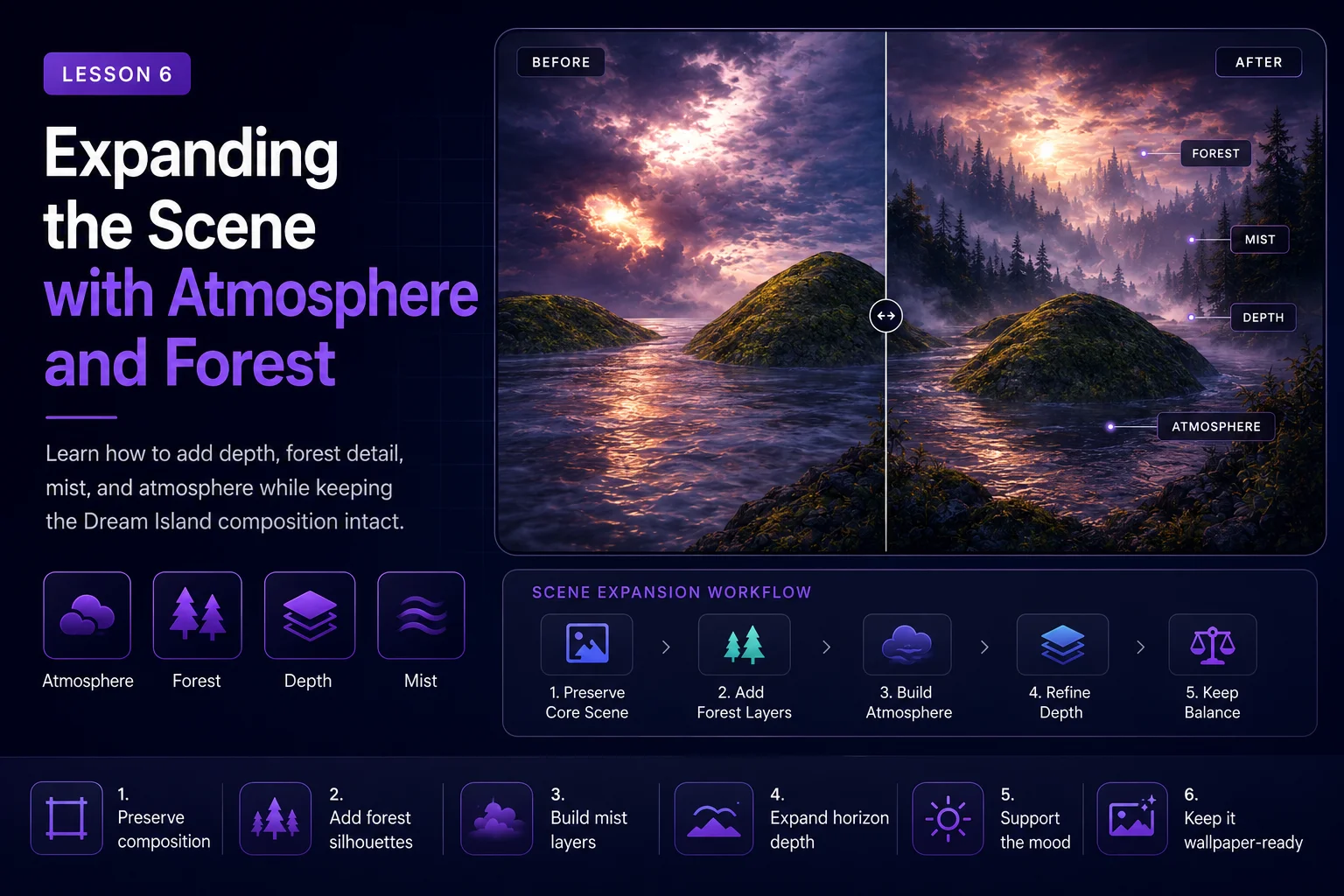
Expanding the Scene with Atmosphere and Forest
After improving the water, rock, moss, and sky, the Dream Island remaster already feels more detailed and cinematic. Now we can carefully expand the world around the original scene.
This lesson focuses on adding atmosphere and forest detail without losing the structure of the original artwork. The goal is to make the environment feel larger, deeper, and more alive while still preserving the core Dream Island identity.
This is an important middle step between a faithful remaster and a full creative reinterpretation. We are not adding villages, bridges, boats, or fantasy story elements yet. We are simply giving the landscape more natural depth.
Why Expand the Scene?
The original Dream Island image has a strong central idea: rocky islands surrounded by reflective water under a dramatic sky.
A modern remaster can make that idea feel bigger by adding subtle environmental details such as:
distant forest silhouettes
mist near the water
atmospheric haze
richer shoreline detail
layered background islands
deeper horizon separation
soft sunset glow through the clouds
These additions support the original scene instead of replacing it.
A good expansion should make the viewer feel that Dream Island belongs to a larger world.
Keep the Island Structure First
Before adding anything new, remember the most important rule:
The original island structure must remain readable.
The central rocky island, water channel, low camera angle, and dramatic sky should still define the image. Forest and atmosphere should be supporting elements, not the new main subject.
If the forest becomes too dominant, the image may stop feeling like Dream Island and become a generic landscape.
What to Add in This Stage
This stage is about natural expansion.
Good additions include:
pine trees in the distance
small tree clusters on island edges
soft fog between land and water
light haze near the horizon
stronger depth between foreground and background
subtle shoreline vegetation
richer shadow layers
warm sunlight breaking through clouds
These details add scale and realism while keeping the image calm and atmospheric.
What to Avoid for Now
Avoid story-heavy elements in this lesson.
Do not add:
fantasy villages
houses
castles
boats
bridges
people
animals
meteors
magical portals
large glowing effects
Those elements belong to later creative reinterpretation lessons. If we add them too early, it becomes harder to judge whether the natural landscape remaster is working.
Atmosphere as a Depth Tool
Atmosphere is one of the most powerful ways to improve a landscape image.
Mist, haze, and soft light can separate the scene into clear depth layers:
foreground water
middle-ground island
background forest
distant sky and horizon
This makes the image feel more cinematic and easier to read.
For Dream Island, atmosphere should stay soft and mysterious. It should not hide the island completely or make the scene look washed out.
A useful prompt line is:
text Add soft atmospheric mist over the water, subtle horizon haze, and layered distance depth while keeping the original rocky island composition clear.
Adding Forest Detail
Forest detail should support the island landscape. The trees should feel like part of the world, not pasted on top.
Good forest direction:
distant pine forest silhouettes
small clusters of trees on rocky edges
dark tree shapes against the sunset sky
natural scale compared to the island
uneven organic placement
Avoid making the forest too dense or too bright. Dream Island should still feel open, with water and sky playing major roles.
A useful prompt line is:
text Add distant pine forest silhouettes and subtle shoreline vegetation that blend naturally with the mossy rocky islands.
Expanding the Horizon
The horizon can make the scene feel more complete. In the original artwork, the background is simple, which gives us room to add depth.
A stronger horizon can include:
distant island shapes
forest-covered landforms
mist between layers
warm light near the waterline
soft cloud reflection in the distance
Keep the horizon lower than the sky’s main drama. The sky should still feel large and important.
Recommended Prompt
Use the material-improved version as your reference image and guide the AI with a controlled expansion prompt.
text Expand the faithful Dream Island remaster with natural atmosphere and forest depth. Preserve the original central rocky island, reflective water channel, low camera angle, mossy stone surfaces, and dramatic cloudy sky. Add distant pine forest silhouettes, subtle shoreline vegetation, soft mist over the water, layered horizon haze, richer background depth, and warm cinematic sunset glow. Keep the scene calm, mysterious, natural, and wallpaper-ready. The new forest and atmosphere should support the original composition, not replace it.
This prompt tells the AI what to add, but also reminds it what must stay unchanged.
Recommended Negative Prompt
Use a negative prompt to prevent the scene from turning into a full fantasy illustration too early.
text no village, no houses, no castle, no bridge, no boats, no people, no animals, no meteors, no magical portal, no city, no modern buildings, no readable text, no logo, no watermark, no extreme fantasy colors, no overcrowded forest, no completely different island layout, no different camera angle
This keeps the result focused on environment and atmosphere.
Use Moderate Creativity
Scene expansion needs a little more creativity than a faithful remaster, but not too much.
A useful approach is:
keep image strength moderate
preserve composition strongly
allow controlled background expansion
avoid high creativity settings
generate several variations
If the AI changes the central island too much, reduce the strength or add stronger preservation language.
If the image barely changes, increase the atmosphere and background detail language slightly.
Compare the Versions
After generating a few results, compare them against the previous material-improved version.
Ask:
Does the island still feel like Dream Island?
Does the forest add depth without becoming the main subject?
Is the mist subtle and useful?
Does the horizon feel larger and more cinematic?
Are the water and sky still important?
Is the image more immersive than before?
Did the AI add unwanted story elements?
The best version should feel expanded, not replaced.
Common Problems
The Forest Takes Over the Image
If the forest becomes too dominant, use stricter language:
subtle distant forest
small background tree silhouettes
preserve open water and sky
do not cover the main island
The Mist Hides Too Much Detail
If the scene becomes too foggy, use:
light mist only
clear central island silhouette
subtle atmospheric haze
preserve rock and water detail
The Scene Becomes Too Fantasy-Like
If the AI adds glowing trees, castles, strange lights, or magical effects, strengthen the negative prompt and add:
natural cinematic landscape
no fantasy buildings
no magical effects
realistic atmosphere
The Original Composition Changes
If the camera angle or island layout changes too much, add:
preserve original camera angle
keep original island placement
maintain the same water channel
faithful landscape expansion
Save the Best Expansion
When you find a strong version, save it clearly.
Example file names:
dream-island-2026-atmosphere-forest-v1
dream-island-2026-expanded-landscape-v2
dream-island-2026-atmosphere-forest-selected
Also save the prompt, negative prompt, source image, and settings. This makes your workflow easier to explain and repeat.
Lesson Takeaway
Atmosphere and forest detail can make an old render feel larger, richer, and more cinematic without changing its core identity.
For Dream Island, this step expands the world around the original island. The scene now has stronger depth, natural scale, soft mist, and a more immersive environment while still feeling connected to the 2001 artwork.
In the next lesson, we will move beyond faithful enhancement and explore a creative reinterpretation: turning Dream Island into a fantasy village.
Course navigation
Continue this course
Previous lesson
AI Remaster Lab: Dream Island 2001 → 2026 · Lesson 05
Improving Water, Rock, Moss, and Sky
Learn how to improve the key natural materials in Dream Island without changing the original scene.
Next lesson
AI Remaster Lab: Dream Island 2001 → 2026 · Lesson 07
Creative Reimagining: Turning the Island into a Fantasy Village
Transform Dream Island into a fantasy village while preserving the original island structure, water, sky, and mood.