
Article
Lesson content
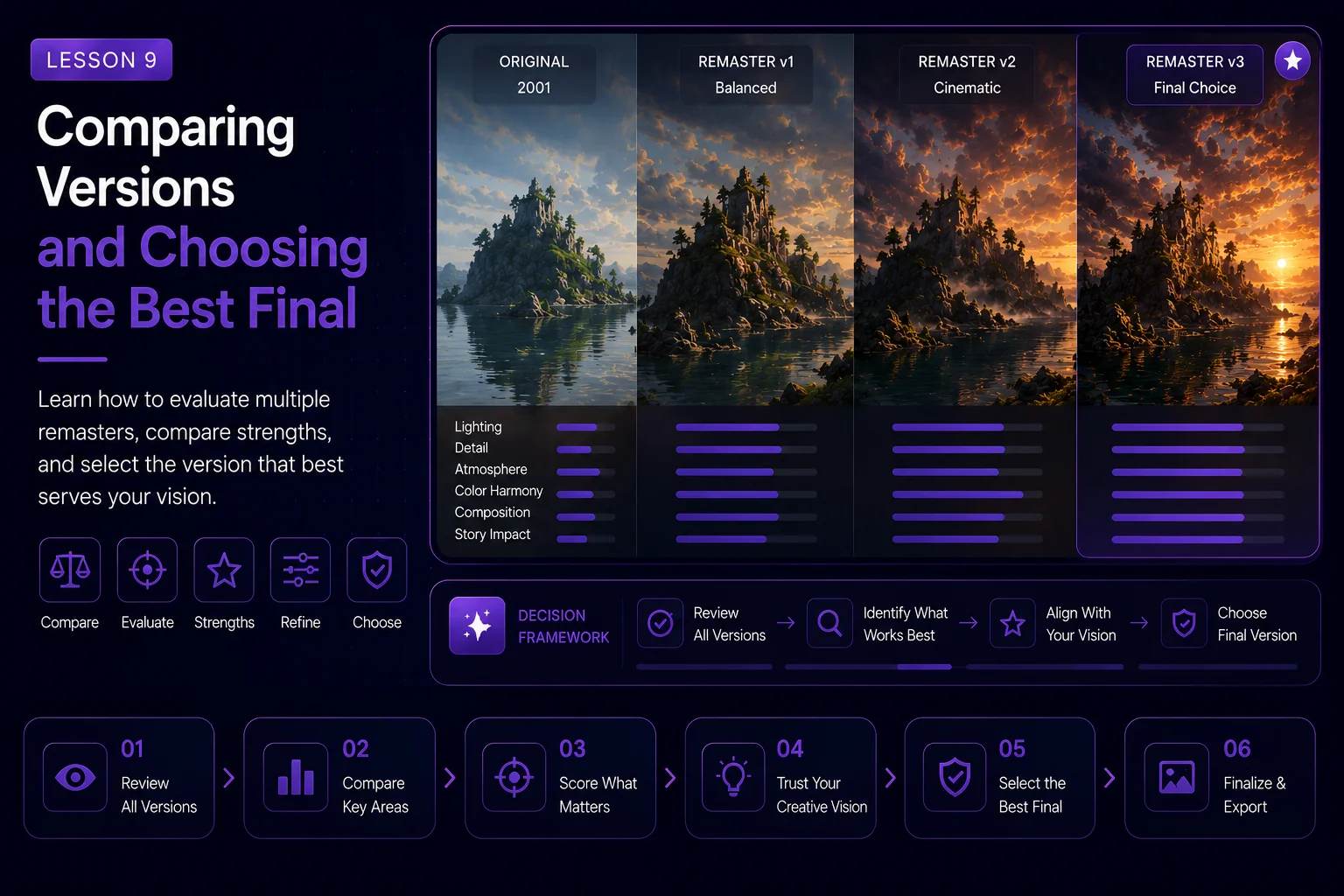
Comparing Versions and Choosing the Best Final
By this stage, the Dream Island project has several possible directions. We started with the original 2001 artwork, created a faithful remaster, improved the natural materials, expanded the scene with atmosphere and forest, and explored a fantasy village reinterpretation with story elements.
Now we need to compare those versions and choose the best final image.
This step is important because AI workflows can produce many attractive results. Not every beautiful image is the right final. The best final should match the goal of the project, preserve the original identity, work as a wallpaper, and be honest about how much the image has changed.
Why Comparison Matters
AI can generate many variations quickly. That speed is useful, but it can also make decision-making harder.
Without a comparison process, it is easy to choose the most dramatic image instead of the strongest image. A version with meteors, glowing lights, many boats, and fantasy buildings may look exciting, but it might not be the best wallpaper or the most respectful remaster.
A good comparison process helps you judge the image with intention instead of emotion.
Gather All Main Versions
Before choosing the final, collect your main versions in one folder or comparison board.
Recommended versions:
original 2001 source image
cleaned AI-ready source
faithful AI remaster
material-improved version
atmosphere and forest version
fantasy village version
story-enhanced version
dramatic alternate version, if created
Seeing the images together makes the evolution clear. It also helps you decide whether the final still feels connected to the original.
Define the Final Goal
Before judging the images, decide what kind of final you want.
There are usually two valid final directions.
Faithful Final
This version should feel like a modern upgrade of the original artwork. It keeps the island, water, sky, and mood close to the 2001 image.
Choose this direction if the goal is restoration, historical respect, or a classic remaster.
Creative Final
This version uses the original as a foundation but adds a stronger new world, such as a fantasy village, bridges, boats, lanterns, and storytelling.
Choose this direction if the goal is reinterpretation, worldbuilding, or a more dramatic course result.
Both are valid, but they should not be described the same way.
Recommended Final Strategy
For a Skinbase Academy course, the strongest approach is to keep two selected finals:
a faithful remaster final
a creative reinterpretation final
This teaches students that AI improvement is not only about one result. It is about choosing the right result for the right purpose.
The faithful version shows respect for the original. The creative version shows how far the idea can be expanded.
Comparison Criteria
Use clear criteria to judge each image.
1. Connection to the Original
Ask:
Can I still recognize Dream Island?
Are the rocky islands still important?
Is the reflective water still part of the composition?
Does the dramatic sky still define the mood?
Does the image feel like an evolution of the source?
If the answer is no, the image may still be useful, but it should be labeled as a loose reinterpretation.
2. Composition Strength
A strong wallpaper needs a clear composition.
Check:
main focal point
balance between sky, water, and land
readable island silhouette
enough open space
no cluttered foreground
no confusing object placement
The best final should be visually clear at both full size and thumbnail size.
3. Material Quality
Look closely at the important surfaces.
Check:
water reflections
rock texture
moss detail
cloud structure
lighting consistency
mist and atmosphere
Avoid selecting an image only because it has strong mood. If the details break under closer inspection, it may not work as a final upload.
4. Story Balance
For the creative version, check whether story elements improve the image.
Ask:
Do the boats, lanterns, bridge, or village add meaning?
Are there too many objects?
Does the story support the original island scene?
Is the image still calm enough to work as a wallpaper?
The best story version should feel alive, not overcrowded.
5. Technical Cleanliness
AI images often contain small problems.
Check for:
fake text
broken architecture
distorted boats
strange reflections
duplicated objects
unnatural water edges
messy roof shapes
impossible lighting
over-sharpened details
noisy artifacts
Do not ignore these issues. A final wallpaper should be clean.
Use a Simple Rating Table
A practical method is to rate each version from 1 to 5.
Suggested categories:
original connection
composition
atmosphere
material quality
wallpaper usability
technical cleanliness
story balance
The highest total score is not always the final answer, but it helps reveal which version is strongest overall.
Example:
text Version: Fantasy Village V3 Original connection: 4/5 Composition: 5/5 Atmosphere: 5/5 Material quality: 4/5 Wallpaper usability: 4/5 Technical cleanliness: 4/5 Story balance: 5/5
This makes the decision easier to explain in a course lesson.
Compare at Different Sizes
Always inspect the image in more than one size.
Check it as:
a large full-resolution image
a desktop wallpaper preview
a course thumbnail
a mobile crop
a small gallery card
Some images look amazing at full size but become unreadable as thumbnails. Others look simple at full size but work beautifully as wallpapers.
A Skinbase final should work in both situations.
Look for Wallpaper Breathing Room
A wallpaper does not need to fill every corner with detail. Empty or calm space can be useful.
Good breathing room can appear as:
open sky
reflective water
soft mist
darker shadow areas
smooth atmospheric gradients
These areas help icons, widgets, and desktop elements remain readable.
If the entire image is filled with tiny high-contrast details, it may be better as concept art than as a wallpaper.
Decide What Each Version Is For
Not every strong version needs to be discarded. You can assign each image a purpose.
Example:
faithful remaster: final archive-style upload
fantasy village: main creative final
dramatic sky version: course cover or teaser
clean natural version: lesson comparison image
experimental meteor version: bonus alternate direction
This makes the workflow more useful. Instead of choosing one winner and deleting everything else, each version can support the course.
Recommended Final Choice for Dream Island
For this course, the best final set is usually:
Final A: Faithful Remaster
This version should keep the original island and water composition while improving materials, lighting, atmosphere, and resolution.
Use this as the respectful remaster.
Final B: Fantasy Village Reinterpretation
This version should include warm houses, lanterns, boats, and a bridge, but without becoming too crowded.
Use this as the creative transformation.
The dramatic meteor or heavy fantasy version can be saved as an alternate experiment, but it should not be the main final unless the course specifically wants a high-drama direction.
Final Selection Checklist
Before marking an image as final, review this checklist:
The image has a clear focal point.
The original Dream Island identity is still visible.
The water, rock, moss, and sky are improved.
The composition works as a wallpaper.
The image is readable as a thumbnail.
Story elements are controlled and intentional.
There is no fake text, logo, or watermark.
There are no obvious AI artifacts.
The image has enough breathing room.
The final label matches the actual transformation.
If the image passes this checklist, it is ready for final preparation.
Naming the Final Files
Use clear names so the project remains organized.
Example:
dream-island-2026-faithful-final
dream-island-2026-fantasy-village-final
dream-island-2026-course-cover
dream-island-2026-teaser
dream-island-2001-to-2026-comparison
Good file names are especially useful when importing images into Skinbase Academy or preparing a before-and-after article.
Write a Short Final Note
For each final version, write a short explanation of what changed.
Example for the faithful final:
This faithful AI remaster preserves the original Dream Island composition while improving water reflections, rock detail, moss texture, sky depth, lighting, and atmospheric quality.
Example for the creative final:
This fantasy village reinterpretation keeps the original Dream Island island-and-water foundation, while adding warm architecture, lanterns, boats, bridge detail, and stronger story atmosphere.
These notes help viewers understand the difference between restoration and reinterpretation.
Lesson Takeaway
Choosing the best final is not about picking the most detailed image. It is about choosing the image that best serves the project goal.
For Dream Island, the strongest result may be a pair of finals: one faithful remaster and one creative fantasy reinterpretation. Together, they show the full power of a controlled AI workflow: respect the original first, then expand it with intention.
In the next lesson, we will prepare the selected final image for Skinbase upload with export settings, tags, description, and presentation notes.
Course navigation
Continue this course
Previous lesson
AI Remaster Lab: Dream Island 2001 → 2026 · Lesson 08
Adding Story Elements Without Overcrowding the Image
Learn how to add boats, lanterns, bridges, wildlife, and sky drama while keeping the Dream Island remaster readable.
Next lesson
AI Remaster Lab: Dream Island 2001 → 2026 · Lesson 10
Preparing the Final Wallpaper for Skinbase
Prepare the selected Dream Island remaster for upload with clean exports, honest labeling, strong metadata, and wallpaper-ready presentation.