
Article
Lesson content
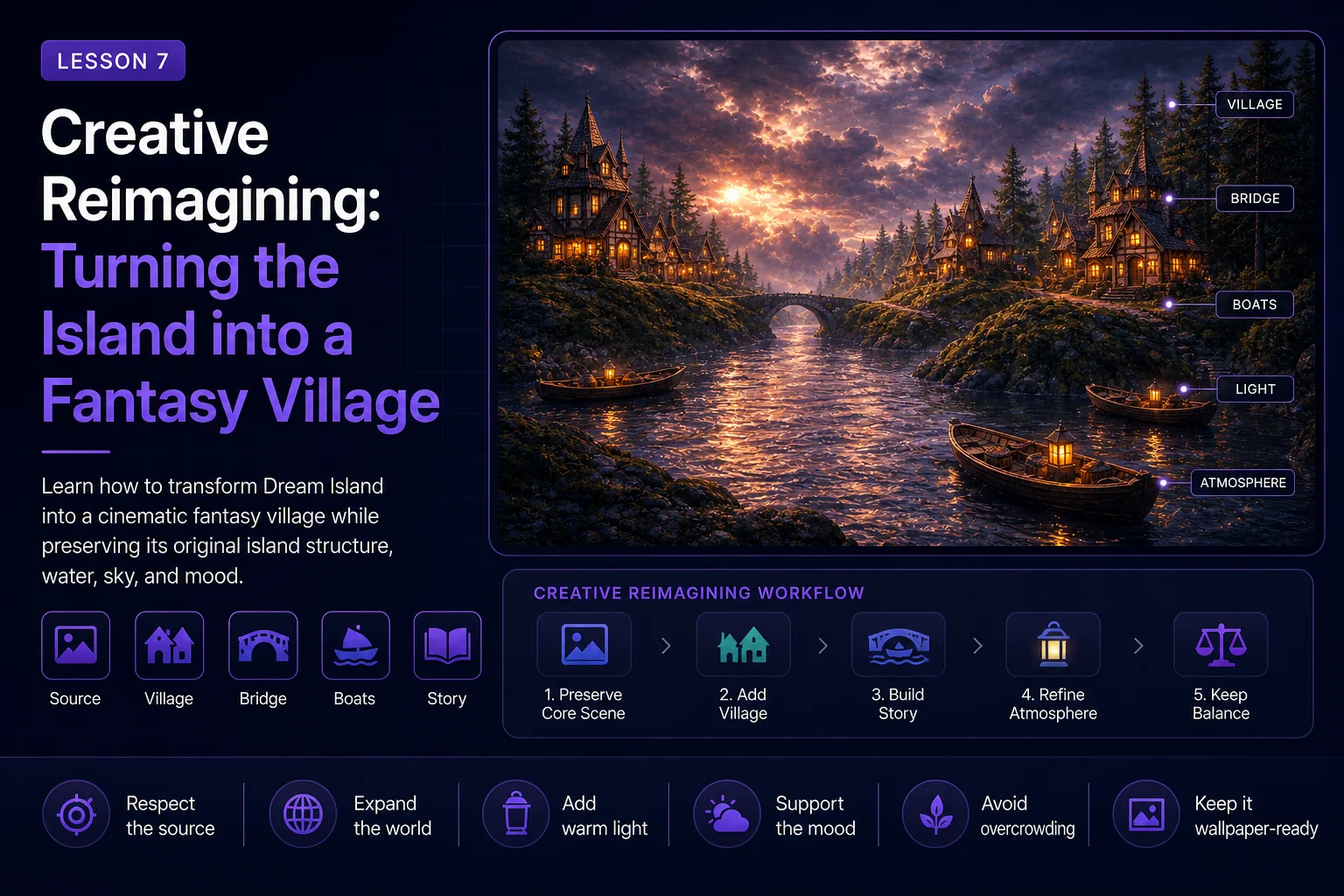
Creative Reimagining: Turning the Island into a Fantasy Village
Up to this point, the Dream Island remaster has stayed close to the original 2001 artwork. We analyzed the source, prepared it for AI, created a faithful remaster, improved the natural materials, and expanded the scene with atmosphere and forest detail.
Now we can move into a more creative stage.
In this lesson, we will use the original island scene as a foundation for a fantasy village reinterpretation. This is no longer a pure restoration. It is a new version inspired by the original composition, mood, and landscape structure.
The goal is to transform Dream Island into a richer story world while still making the original idea visible.
Remaster vs Reimagining
Before writing prompts, it is important to understand the difference between a remaster and a reimagining.
A faithful remaster improves the existing image. It keeps the same subject, layout, and mood while improving quality, lighting, detail, and atmosphere.
A creative reimagining uses the original image as a starting point. It may add new story elements, new architecture, stronger mood, and a more developed world.
For Dream Island, a faithful remaster asks:
What would this 2001 island render look like with modern detail and lighting?
A creative reimagining asks:
What kind of world could this island become if we expanded its story?
Both approaches are valid, but they should be labeled honestly.
Why a Fantasy Village Works
The original Dream Island already has qualities that support a fantasy village concept:
isolated rocky islands
water channels between landforms
dramatic sky
mossy stone surfaces
mysterious atmosphere
strong foreground and background depth
These elements naturally suggest a hidden settlement, a small harbor, or a dreamlike village built into the rocks.
The key is to add the village in a way that supports the landscape instead of covering it.
Preserve the Dream Island Foundation
Even in a creative reinterpretation, we should preserve the source identity.
Keep:
the central island structure
the reflective water
the low landscape viewpoint
the dramatic cloudy sky
mossy rocky surfaces
the mysterious dreamlike atmosphere
the feeling of a small world surrounded by water
The village should feel like it grew from the island, not like it was pasted onto a random background.
What to Add
For this reinterpretation, we can add story-rich but controlled fantasy elements.
Good additions include:
small wooden houses
warm glowing windows
stone or wooden bridges
lanterns near the water
small boats
docks or piers
subtle smoke from chimneys
pine trees around the settlement
soft evening fog
warm lights reflected in the water
These details create a cozy contrast with the dramatic sky and cold water.
What to Avoid
It is easy to push a fantasy version too far. Avoid turning the image into a crowded theme-park scene.
Avoid:
giant castles
huge modern buildings
large crowds
oversized fantasy creatures
neon magic everywhere
extreme fire or explosions
too many boats
too many houses
unreadable AI text or signs
random objects that break the composition
The village should add story, not noise.
Define the Creative Direction
Before generating, write a simple direction statement.
For this lesson, the direction is:
Reimagine Dream Island as a small cinematic fantasy village built into mossy rocky islands, with warm lanterns, bridges, boats, and glowing windows, while preserving the original water, sky, island structure, and dreamlike mood.
This gives the AI a clear creative target.
Recommended Prompt
Use the atmosphere-and-forest version as your reference image. This gives the AI a stronger modern base than the original source alone.
text Reimagine the Dream Island remaster as a cozy cinematic fantasy village built on mossy rocky islands. Preserve the original island structure, reflective water channel, low camera angle, dramatic cloudy sky, and mysterious dreamlike atmosphere. Add small warm wooden houses built into the rocks, glowing windows, a simple stone or wooden bridge, lantern-lit docks, a few small boats, subtle chimney smoke, pine trees, soft mist over the water, and warm evening light reflected in the waves. Keep the composition balanced, detailed, atmospheric, cinematic, and wallpaper-ready.
This prompt clearly says what to preserve and what to add.
Recommended Negative Prompt
Use a negative prompt to keep the scene controlled.
text no giant castle, no modern buildings, no city skyline, no crowded village, no close-up people, no large characters, no dragons, no monsters, no neon signs, no readable text, no logos, no watermark, no distorted houses, no broken boats, no messy architecture, no oversaturated cartoon colors, no completely different island layout, no different camera angle
This prevents the AI from turning the image into something too busy or unrelated.
Keep the Village Small
The strongest version is usually not the one with the most buildings. A small village often feels more magical than a huge one.
A good balance might include:
two or three main houses
a few small roof shapes in the background
one bridge
one or two small boats
several warm lantern points
visible rock, moss, water, and sky
If the village covers the island completely, the original Dream Island identity becomes weaker.
Use Warm Light as Story
Warm light is the emotional center of this reinterpretation.
The original image has a cold, mysterious atmosphere. Adding warm windows and lanterns creates contrast. It suggests life, shelter, and story inside the landscape.
Useful prompt phrases:
warm glowing windows
lantern light reflected in the water
cozy evening village atmosphere
soft golden lights against cool blue-gray surroundings
subtle candlelit details
Do not make every part of the image bright. The warmth should appear in selected areas, so the scene keeps its mystery.
Add Bridges and Boats Carefully
Bridges and boats are excellent story elements because they explain how the island world is used.
A bridge can connect the rocky landforms. Boats can make the water feel active and lived-in. But too many of them can clutter the composition.
Use restrained language:
one simple stone bridge
a few small wooden boats
lantern-lit dock
subtle harbor detail
small scale compared to the rocks
The original water channel should still be visible.
Generate Multiple Directions
Create several variations and compare them.
Try at least three versions:
Version A: Cozy Village
Focus on warm houses, windows, docks, and lanterns.
Version B: Natural Fantasy Village
Focus on houses blended into mossy rocks, trees, mist, and water.
Version C: Cinematic Village
Focus on dramatic sky, stronger lighting, reflections, and wallpaper impact.
Do not decide too quickly. Sometimes the best final version combines the warmth of one result with the composition of another.
Evaluation Checklist
After generating, compare the fantasy village version with the previous natural landscape version.
Ask:
Does it still feel connected to Dream Island?
Is the island structure still visible?
Is the water still an important part of the image?
Does the sky still define the mood?
Is the village balanced and readable?
Are the buildings believable and not distorted?
Are there any fake signs, text, or logos?
Does the image work as a wallpaper?
Is the result a clear reimagining, not a mislabeled restoration?
A good fantasy reinterpretation should feel like a possible future version of the original idea.
Common Problems
The Village Becomes Too Large
If the village takes over the whole scene, make the prompt stricter:
text small fantasy village, only a few buildings, preserve large visible areas of rock, water, and sky
The Architecture Looks Broken
If houses become distorted, add:
text simple readable wooden houses, clean roof shapes, believable small architecture, stable construction
The Scene Becomes Too Cartoonish
If the style becomes too bright or playful, use:
text cinematic fantasy realism, atmospheric lighting, muted natural colors, painterly but believable detail
The Original Island Disappears
If the AI replaces the landscape, strengthen the preservation language:
text preserve the original island layout, keep the same water channel, maintain the original low camera angle and rocky island silhouette
Label the Result Honestly
When publishing this image on Skinbase, it should not be described as a simple restoration. It is a creative reinterpretation.
A clear description might be:
A fantasy village reinterpretation of the original 2001 Dream Island artwork. The island, water, and dramatic sky concept were preserved, while new architectural, lighting, and storytelling elements were added through an AI-assisted remaster workflow.
This kind of transparency helps viewers understand the process and respect the original source.
Save the Version Clearly
Use file names that make the creative direction obvious.
Examples:
dream-island-2026-fantasy-village-v1
dream-island-2026-fantasy-village-warm-lights-v2
dream-island-2026-creative-reimagining-selected
Also save the source image, prompt, negative prompt, and settings. This makes the lesson repeatable and useful for future Skinbase Academy examples.
Lesson Takeaway
Creative reimagining lets us turn an old artwork into a new story world. The key is balance.
For Dream Island, the fantasy village version works best when the original rocky island, reflective water, dramatic sky, and dreamlike mood remain visible. The houses, bridges, boats, and lanterns should add life and story without hiding the source identity.
In the next lesson, we will look at how to add extra story elements without overcrowding the image.
Course navigation
Continue this course
Previous lesson
AI Remaster Lab: Dream Island 2001 → 2026 · Lesson 06
Expanding the Scene with Atmosphere and Forest
Learn how to add depth, forest detail, mist, and atmosphere while keeping the Dream Island composition intact.
Next lesson
AI Remaster Lab: Dream Island 2001 → 2026 · Lesson 08
Adding Story Elements Without Overcrowding the Image
Learn how to add boats, lanterns, bridges, wildlife, and sky drama while keeping the Dream Island remaster readable.