
Article
Lesson content
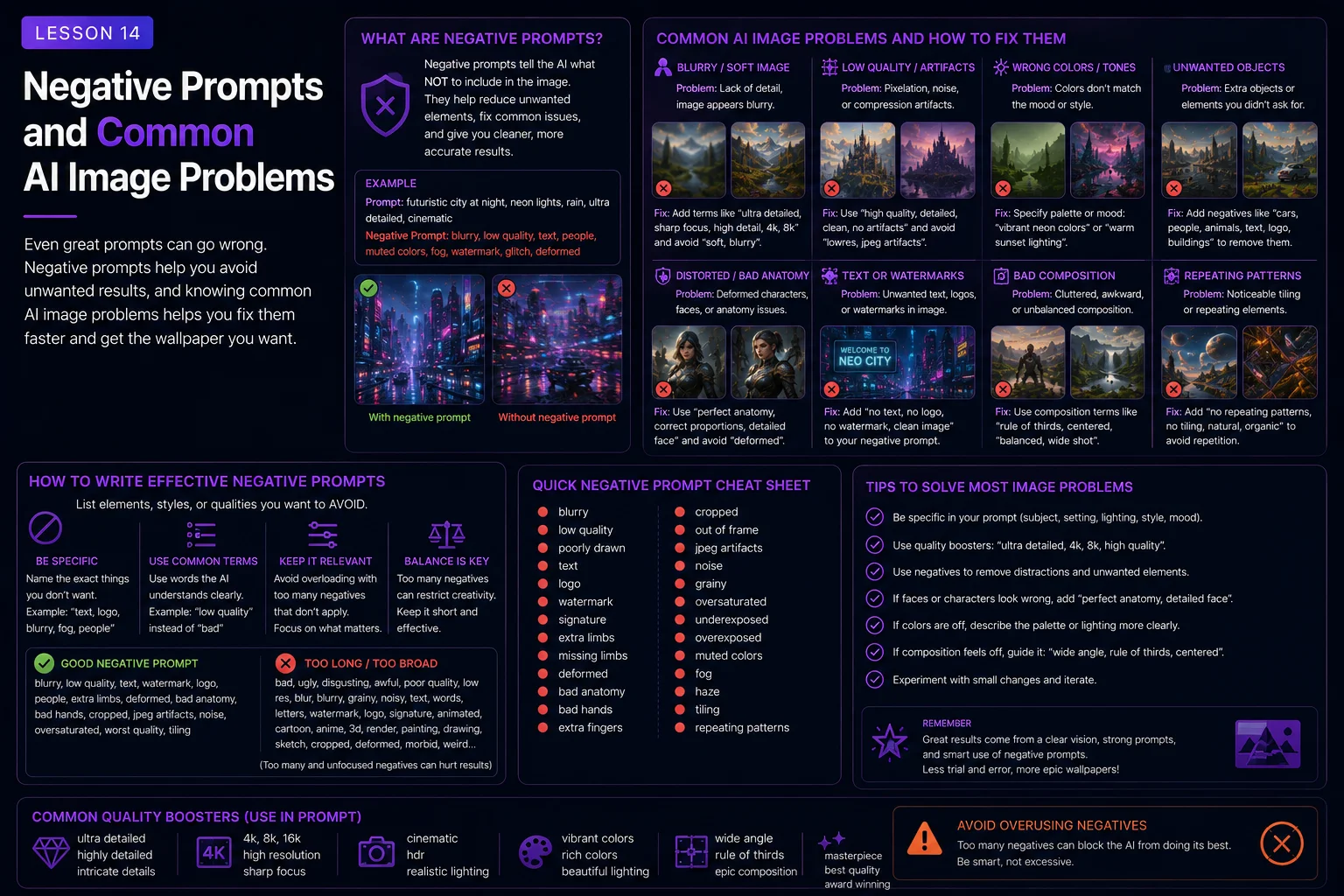
Negative Prompts and Common AI Image Problems
AI image tools can create impressive wallpapers, but they can also create strange mistakes.
A beautiful fantasy scene may include random text. A character wallpaper may have extra fingers. A cyberpunk city may be filled with fake logos. A nature image may look too noisy. A retro pixel-art prompt may become blurry instead of crisp. A great idea can be weakened by artifacts, bad cropping, distorted anatomy, clutter, or style confusion.
Negative prompts help reduce these problems.
A negative prompt tells the AI what to avoid. It does not guarantee a perfect result, but it gives the model useful boundaries. When used well, negative prompts can make your wallpapers cleaner, more readable, and more Skinbase-ready.
In this lesson, you will learn how to use negative prompts and prevention phrases to avoid common AI image problems.
What Is a Negative Prompt?
A negative prompt is a list of things you do not want in the image.
For example:
no text, no logo, no watermark, no distorted face, no extra limbs, no cropped subject
Some AI tools have a separate negative prompt field. Others expect you to include these restrictions inside the main prompt.
Both approaches can work.
Main prompt example:
A peaceful mountain lake at sunrise, wide 16:9 desktop wallpaper, soft mist, warm golden light, realistic digital painting, no text, no logo, no watermark.
Separate negative prompt example:
text, logo, watermark, signature, blurry, distorted, noisy, low quality
The goal is the same: guide the AI away from unwanted results.
Negative Prompts Are Not Magic
Negative prompts can help, but they do not fix everything.
If the main prompt is unclear, overloaded, or contradictory, the image may still have problems. A negative prompt works best when the positive prompt is already strong.
Weak main prompt:
Epic fantasy sci-fi cyberpunk dragon robot castle city forest battle wallpaper with everything.
Negative prompt:
no clutter, no bad anatomy, no text
This may still produce a messy image because the main idea is too overloaded.
Better main prompt:
A dragon flying above a distant fantasy castle, wide 16:9 desktop wallpaper composition, dragon placed in the upper-right third, large open sky, soft moonlight, cinematic fantasy art style.
Negative prompt:
no text, no logo, no watermark, no cropped wings, no clutter
Now the negative prompt supports a clear idea.
A good rule:
Fix the main prompt first. Use negative prompts to clean up the result.
The Most Useful Wallpaper Restrictions
For most Skinbase wallpaper prompts, these restrictions are useful:
no text
no logo
no watermark
no signature
no random letters
no cropped subject
no clutter
no blurry details
no low-quality artifacts
A simple default restriction line:
no text, no logo, no watermark, no signature, no random letters, no low-quality artifacts
This is a good starting point for many wallpaper prompts.
For character wallpapers, add anatomy restrictions:
no distorted face, no extra limbs, no extra fingers, no broken hands, no cropped head
For retro and pixel-art wallpapers, add style restrictions:
no blurry pixels, no photorealistic rendering, no soft photo texture, no modern 3D render look
The best negative prompt depends on the image type.
Problem 1: Random Text, Logos, and Watermarks
One of the most common AI image problems is unwanted text.
This can appear as fake signs, strange letters, unreadable symbols, random branding, signatures, or watermark-like marks.
This is especially common in:
cyberpunk scenes
city streets
posters
product-style images
signs and billboards
fantasy banners
sci-fi interfaces
fake magazine-style compositions
Useful restrictions:
no text
no readable text
no random letters
no logo
no fake logo
no watermark
no signature
no brand names
no typography
Example:
Weak prompt:
A cyberpunk street full of neon signs and advertisements.
Better prompt:
A rainy cyberpunk street at night, abstract neon light panels, blue and pink reflections on wet pavement, wide 16:9 desktop wallpaper composition, cinematic atmosphere, no readable text, no random letters, no logos, no watermark.
Instead of asking for many signs, ask for abstract light panels or neon glow. This keeps the cyberpunk mood without inviting fake text.
Problem 2: Bad Hands and Extra Fingers
Hands are one of the hardest things for AI tools to create cleanly.
Common problems include:
extra fingers
missing fingers
fused fingers
twisted hands
broken wrists
strange gloves
hands blending into objects
Useful restrictions:
no extra fingers
no fused fingers
no broken hands
no malformed hands
no distorted fingers
no missing fingers
But restrictions are not enough. You can also simplify the pose.
Weak prompt:
A warrior jumping through the air while holding two swords, casting magic, pointing at the viewer, and grabbing a shield.
Better prompt:
A heroic fantasy warrior standing on a rocky mountain pass, holding one glowing sword at their side, full body visible, strong silhouette, no extra fingers, no broken hands, no text, no watermark.
Simple poses often produce cleaner hands.
Problem 3: Distorted Faces and Strange Eyes
Faces are another common problem area.
AI-generated faces can have uneven eyes, strange teeth, warped expressions, asymmetry, or blurry details.
Useful restrictions:
no distorted face
no uneven eyes
no blurry face
no malformed face
no strange teeth
no warped expression
no extra eyes
For portraits, also guide the positive prompt:
clean face, natural expression, soft portrait lighting, head and shoulders fully visible, clean background
Example:
A calm fantasy queen portrait, head and shoulders fully visible, centered composition, soft magical light, clean dark background, natural expression, no distorted face, no uneven eyes, no cropped head, no text, no watermark.
For beginner character prompts, avoid extreme facial expressions, very complex angles, and crowded backgrounds.
Problem 4: Extra Limbs and Broken Anatomy
Character images can sometimes generate extra arms, extra legs, twisted bodies, strange shoulders, or impossible poses.
Useful restrictions:
no extra limbs
no extra arms
no extra legs
no malformed anatomy
no twisted body
no broken pose
no duplicated body parts
no distorted proportions
Positive prompt support:
simple standing pose
full body visible
natural anatomy
clean silhouette
relaxed pose
safe margins around the character
Example:
A sci-fi explorer standing calmly on a desert planet, full body visible, simple standing pose, wide 16:9 desktop wallpaper composition, character placed on the left third, large alien sky on the right, no extra limbs, no malformed anatomy, no cropped head, no text, no watermark.
Simple and readable poses are easier to generate than complex action poses.
Problem 5: Bad Cropping
Bad cropping can ruin an otherwise strong wallpaper.
Common cropping problems include:
cropped head
cut-off hands
cut-off feet
cropped wings
weapon leaving the frame
animal ears cut off
subject touching the edge
important building cut off
Useful restrictions:
no cropped head
no cut-off hands
no cut-off feet
no cropped wings
no cropped subject
no subject touching the edges
Positive prompt support:
full body visible
complete subject inside the frame
safe margins around the subject
subject placed slightly right of center
wide environmental shot
Example:
A majestic white wolf standing on a snowy ridge, full body visible with safe margins, wide 16:9 desktop wallpaper composition, wolf placed slightly right of center, large moonlit sky on the left, no cropped ears, no cut-off paws, no distorted anatomy, no text, no watermark.
For wallpaper prompts, always think about the frame.
Problem 6: Too Much Clutter
Clutter happens when too many objects compete for attention.
This is common in fantasy, sci-fi, cyberpunk, and abstract prompts.
Clutter can make wallpapers uncomfortable because the whole image becomes visually noisy.
Useful restrictions:
no clutter
no messy background
no busy edges
no overcrowded composition
no visual noise
no chaotic details
no excessive small objects
Positive prompt support:
clean composition
calm negative space
detailed focal point with clean surrounding space
simple atmospheric background
large open sky
uncluttered foreground
Example:
Weak prompt:
A fantasy scene with a dragon, wizard, army, castle, forest, river, moon, stars, lightning, fire, portal, ruins, fairies, and glowing crystals everywhere.
Better prompt:
A lone wizard standing before a glowing magical portal in ancient forest ruins, wide 16:9 fantasy wallpaper composition, soft blue light, misty background, strong silhouette, detailed but uncluttered, no text, no watermark, no clutter.
Less clutter usually creates more impact.
Problem 7: Blurry or Low-Quality Results
Sometimes AI images look soft, blurry, muddy, or unfinished.
Useful restrictions:
no blurry subject
no low-quality artifacts
no muddy details
no noisy texture
no compression artifacts
no smeared details
no unfinished render
Positive prompt support:
sharp focus on the main subject
clean detailed artwork
crisp silhouettes
polished high-resolution wallpaper
refined details
smooth gradients
Example:
A peaceful mountain lake at sunrise, sharp mountain silhouettes, smooth lake reflection, soft mist, polished high-resolution wallpaper, realistic digital landscape painting, no blurry subject, no low-quality artifacts, no text, no watermark.
For wallpapers, clarity matters because the image will be viewed full-screen.
Problem 8: Style Confusion
Style confusion happens when the prompt asks for too many visual styles at once.
Weak prompt:
Photorealistic watercolor anime pixel art 3D oil painting fantasy concept art.
This gives the AI mixed instructions.
Useful restrictions:
no mixed styles
no photorealistic rendering, if creating pixel art
no modern 3D render look, if creating retro art
no blurry pixel filter, if creating crisp pixel art
Positive prompt support:
choose one main style
use clear style language
match style to mood
avoid conflicting medium words
Better prompt:
A fantasy castle above a misty valley, cinematic fantasy digital painting style, soft golden sunrise lighting, wide 16:9 wallpaper composition, no text, no watermark.
Or:
A fantasy castle above a misty valley, retro 16-bit pixel art style, limited 32-color palette, crisp pixel edges, wide 16:9 wallpaper composition, no blurry pixels, no photorealistic rendering, no text, no watermark.
Choose one direction and protect it.
Problem 9: Fake Details in Architecture and Technology
AI can invent strange details in buildings, machines, vehicles, and interfaces.
Common problems include:
impossible architecture
fake machinery
random wires
broken vehicles
unreadable control panels
strange engine shapes
messy sci-fi details
fake interface text
Useful restrictions:
no random text
no unreadable labels
no messy machinery
no broken perspective
no distorted architecture
no cluttered panels
no fake logos
Positive prompt support:
clean architecture
simple futuristic shapes
sharp silhouettes
believable mechanical design
abstract glowing panels instead of readable screens
detailed but uncluttered technology
Example:
A futuristic city skyline at night, clean sci-fi architecture, sharp building silhouettes, abstract glowing panels, city placed in the lower third, large dark sky above, no readable text, no random letters, no logos, no watermark.
For sci-fi images, abstract panels are often better than asking for detailed readable interfaces.
Problem 10: Pixel Art That Looks Blurry
AI tools often create images that look like normal digital art with a pixel effect on top.
For real retro-style prompts, you need strong positive and negative constraints.
Useful restrictions:
no blurry pixels
no soft photo texture
no photorealistic rendering
no modern 3D render look
no anti-aliased blur
no noisy detail
Positive prompt support:
crisp pixel edges
clean square pixels
limited 16-color palette
limited 32-color palette
simple readable shapes
strong silhouettes
old-school computer art style
Example:
A retro 16-bit pixel art spaceship above a blue alien planet, limited 32-color palette, crisp pixel edges, clean readable silhouette, wide 16:9 wallpaper composition, no blurry pixels, no photorealistic rendering, no text, no watermark.
For pixel art, the positive prompt and negative prompt must work together.
Problem 11: Overly Dark Images
Dark images can be beautiful, but they can become hard to use as wallpapers if important details disappear.
Useful restrictions:
no muddy shadows
no unreadable subject
no overly dark image
no lost details
Positive prompt support:
readable silhouette
subtle highlights
balanced contrast
clear focal point
soft rim light
moonlight on the subject
Example:
A ruined gothic cathedral in a black forest, cold moonlight, thick fog, dark blue-gray palette, readable stone silhouettes, subtle silver highlights, wide 16:9 desktop wallpaper, no muddy shadows, no text, no watermark.
Dark does not have to mean unreadable.
Problem 12: Oversaturated or Noisy Colors
Too many bright colors can make a wallpaper tiring to use.
Useful restrictions:
no oversaturation
no harsh color noise
no chaotic colors
no rainbow clutter
no excessive glow
Positive prompt support:
balanced color palette
limited color palette
controlled saturation
soft contrast
clean color harmony
one accent color
Example:
A magical city at twilight, blue and gold color palette, glowing windows, soft mist, balanced color harmony, wide 16:9 desktop wallpaper, no oversaturation, no excessive glow, no text, no watermark.
A wallpaper can be colorful without being chaotic.
How to Build a Negative Prompt by Image Type
Different image types need different negative prompts.
Landscape Wallpapers
Common problems:
muddy details
noisy foliage
strange perspective
oversaturation
fake text
cluttered foreground
Useful negative prompt:
no text, no logo, no watermark, no noisy foliage, no muddy details, no oversaturation, no cluttered foreground
Example main prompt:
A peaceful mountain lake at sunrise, wide 16:9 desktop wallpaper composition, lake reflection in the foreground, pine forest in the midground, snow mountains in the background, soft mist, realistic digital landscape painting.
Character Wallpapers
Common problems:
distorted face
extra limbs
bad hands
cropped head
busy background
Useful negative prompt:
no distorted face, no uneven eyes, no extra limbs, no extra fingers, no broken hands, no cropped head, no cut-off hands, no text, no watermark
Example main prompt:
A heroic fantasy warrior in silver armor, full body visible with safe margins, standing on a rocky mountain pass, dramatic sunset rim lighting, wide 16:9 wallpaper composition.
Sci-Fi Wallpapers
Common problems:
fake text
messy technology
random logos
cluttered panels
too many lights
Useful negative prompt:
no readable text, no random letters, no fake logos, no watermark, no cluttered panels, no messy machinery, no excessive neon glow
Example main prompt:
A futuristic city skyline at night, glowing towers, distant flying vehicles, city placed in the lower third, large clean sky above, neon blue and violet lighting, clean sci-fi concept art style.
Pixel Art Wallpapers
Common problems:
blurry pixels
modern render look
too much detail
fake text
soft photo texture
Useful negative prompt:
no blurry pixels, no photorealistic rendering, no soft photo texture, no modern 3D render look, no noisy detail, no text, no watermark
Example main prompt:
A retro 16-bit pixel art spaceship above an alien ocean, limited 32-color palette, crisp pixel edges, wide 16:9 wallpaper composition, large starfield background.
Avoid Overloading the Negative Prompt
A negative prompt can become too long.
If you list too many restrictions, the AI may ignore some of them or produce a flat, lifeless image.
Weak negative prompt:
no text, no logo, no watermark, no hands, no face, no eyes, no hair, no colors, no shadows, no buildings, no people, no background, no details, no blur, no style, no everything
This removes too much direction.
Better negative prompt:
no text, no logo, no watermark, no distorted face, no extra limbs, no cropped head, no clutter
Use the restrictions that matter most for the image.
A good rule:
Target the likely problems. Do not list every possible problem.
Use Positive Prevention Phrases
Sometimes positive instructions work better than negative ones.
Instead of only saying:
no clutter
Also say:
clean composition, calm negative space, simple atmospheric background
Instead of only saying:
no cropped head
Also say:
head fully visible, safe margins around the subject
Instead of only saying:
no blurry pixels
Also say:
crisp pixel edges, clean square pixels, limited color palette
Positive and negative instructions should support each other.
Before and After Example
Basic prompt:
A cyberpunk character wallpaper.
This is too open. It may create random text, fake logos, bad anatomy, clutter, and poor cropping.
Improved prompt:
A cyberpunk detective in a dark long coat standing on a rainy rooftop at night, neon blue and pink reflections on wet surfaces, wide 16:9 desktop wallpaper composition, character placed on the right third, large dark city skyline on the left, strong readable silhouette, cinematic cyberpunk style, no readable text, no random letters, no logos, no distorted face, no extra limbs, no cropped head, no watermark.
The improved prompt controls:
Character type
Scene
Lighting
Composition
Background space
Style
Text problems
Anatomy problems
Cropping problems
This makes the image more likely to work as a polished wallpaper.
Beginner Negative Prompt Formula
Use this formula when writing wallpaper prompts:
Positive prompt + likely problem restrictions + general cleanup restrictions
Example:
A peaceful fantasy castle above a misty valley, wide 16:9 desktop wallpaper composition, castle placed on the right third, large open sky on the left, soft golden sunrise lighting, cinematic fantasy digital painting style, detailed but uncluttered, no text, no logo, no watermark, no cluttered background, no low-quality artifacts.
For characters:
A fantasy warrior standing on a rocky mountain pass, full body visible with safe margins, dramatic sunset rim lighting, cinematic fantasy illustration style, no cropped head, no extra limbs, no broken hands, no distorted face, no text, no watermark.
For pixel art:
A retro 16-bit pixel art spaceship above a blue alien planet, limited 32-color palette, crisp pixel edges, wide 16:9 wallpaper composition, no blurry pixels, no photorealistic rendering, no text, no watermark.
Quick Negative Prompt Library
Use these groups as starting points.
General wallpaper cleanup:
no text, no logo, no watermark, no signature, no random letters, no low-quality artifacts
Character cleanup:
no distorted face, no uneven eyes, no extra limbs, no extra fingers, no broken hands, no cropped head
Cropping cleanup:
no cropped subject, no cut-off hands, no cut-off feet, no cropped wings, no subject touching the edges
Background cleanup:
no clutter, no messy background, no busy edges, no visual noise, no excessive small objects
Sci-fi cleanup:
no readable text, no random letters, no fake logos, no cluttered panels, no messy machinery
Pixel art cleanup:
no blurry pixels, no photorealistic rendering, no soft photo texture, no modern 3D render look, no anti-aliased blur
Dark image cleanup:
no muddy shadows, no unreadable subject, no lost details, no overly dark image
Color cleanup:
no oversaturation, no harsh color noise, no chaotic colors, no excessive glow
Skinbase Creator Tip
Before uploading a wallpaper to Skinbase, inspect it carefully.
Check for:
fake text
hidden watermarks
strange signatures
distorted faces
broken hands
extra limbs
bad cropping
noisy backgrounds
blurry details
oversaturated colors
unreadable subjects
Some problems are small enough to fix with editing or regeneration. Others may require rewriting the prompt.
A clean upload feels more professional and is easier for viewers to enjoy, download, and collect.
Practice Exercise
Start with this prompt:
A fantasy warrior standing before a glowing portal.
Now identify likely problems:
bad hands
distorted face
cropped head
extra limbs
messy background
fake text or symbols
Now improve the prompt:
A heroic fantasy warrior standing before a glowing magical portal in ancient ruins, full body visible with safe margins, wide 16:9 desktop wallpaper composition, character placed on the right third, portal glowing softly in the background, strong readable silhouette, cinematic fantasy illustration style, no cropped head, no extra limbs, no broken hands, no distorted face, no random text, no logo, no watermark, no cluttered background.
Now try your own.
Choose one subject:
cyberpunk street
white wolf
mountain lake
retro spaceship
sci-fi pilot
dark fantasy castle
Write a positive prompt first. Then add only the negative restrictions that match the likely problems.
Key Takeaways
Negative prompts help reduce common AI image problems, but they work best with a strong positive prompt.
To use them well:
Start with a clear main prompt.
Target the problems most likely to appear.
Use general cleanup restrictions for text, logos, and watermarks.
Use anatomy restrictions for characters.
Use cropping restrictions for subjects near the frame edge.
Use style restrictions for pixel art and retro prompts.
Avoid overloading the negative prompt.
Combine negative prompts with positive prevention phrases.
A strong negative prompt does not replace good composition, clear subject control, and style direction. It supports them.
In the next lesson, you will learn how to move from a first prompt to a final image through iteration, critique, refinement, and preparation for upload.
Lesson navigation
Continue in order
Previous lesson
Wallpaper Prompt Engineering for Skinbase Creators · Lesson 13
Retro, Pixel Art, and Amiga-Inspired Wallpaper Prompts
Learn how to write clearer retro, pixel art, and Amiga-inspired wallpaper prompts with stronger constraints, palettes, and readable composition.
Next lesson
Wallpaper Prompt Engineering for Skinbase Creators · Lesson 15
From First Prompt to Final Image
Learn how to improve an AI wallpaper through prompt iteration, critique, refinement, and final preparation.