
Article
Lesson content
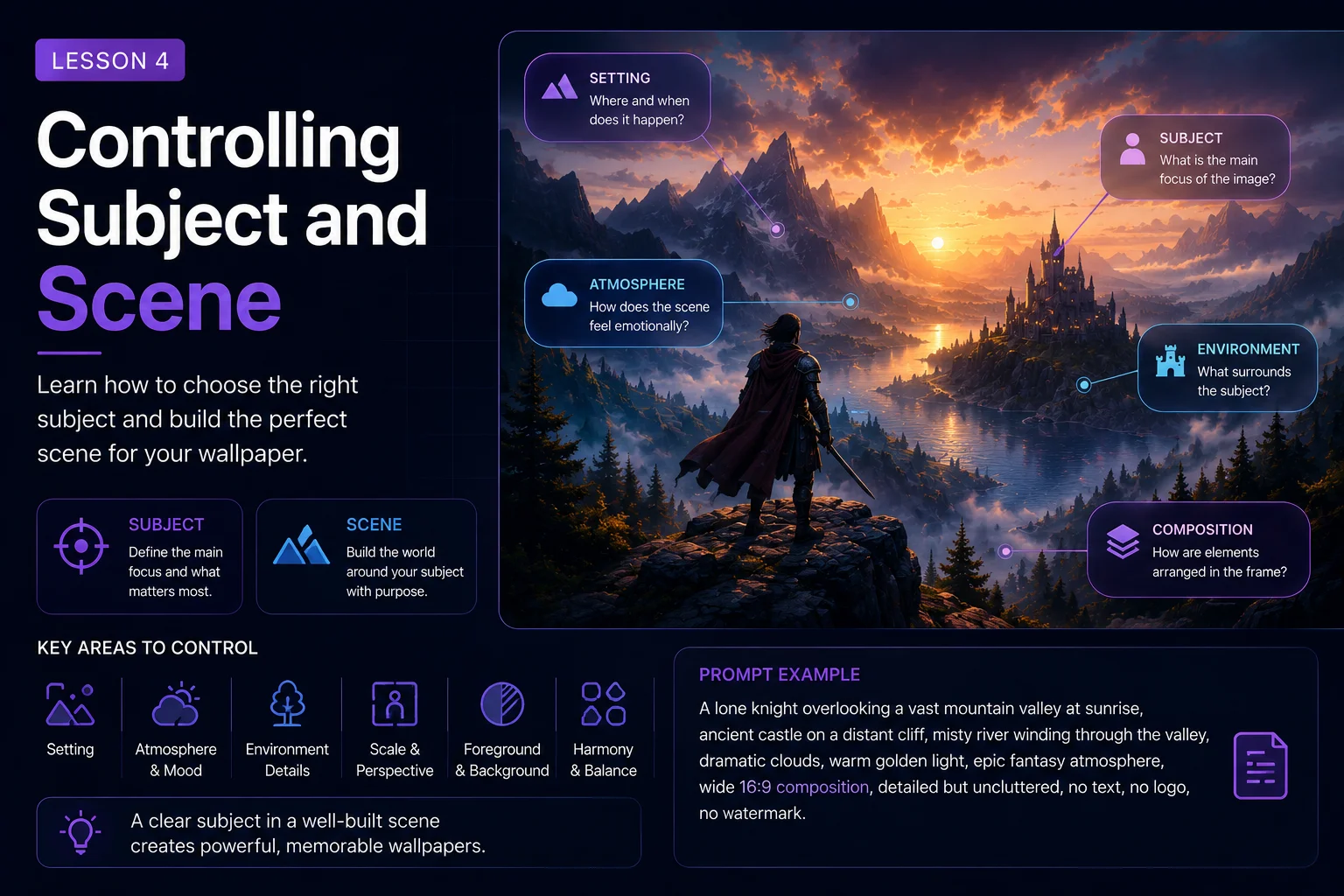
Controlling Subject and Scene
A strong wallpaper prompt needs a clear subject and a clear scene.
The subject is the main focus of the image. The scene is the world around it. When these two parts work together, the image feels intentional. When they are unclear, the result can feel random, crowded, or difficult to understand.
Many beginner prompts fail because they add too many subjects, too many locations, or too many visual ideas at once. The AI tries to include everything, and the final image becomes messy.
In this lesson, you will learn how to describe the main subject clearly, build a useful scene around it, and avoid overloading your prompt.
Subject vs. Scene
Before writing a prompt, separate the subject from the scene.
Subject: What is the main focus?
Scene: Where is the subject placed?
Example:
A lone astronaut standing on a rocky alien planet under a huge glowing moon.
Subject:
A lone astronaut
Scene:
A rocky alien planet under a huge glowing moon
This is simple, but very important. If you cannot identify the subject and the scene, your prompt may not be focused enough.
Start With One Main Subject
A wallpaper is usually stronger when it has one main subject.
That subject can be small, large, close, distant, realistic, fantasy, abstract, or symbolic. But it should be clear.
Examples of clear subjects:
A glowing fantasy castle
A lone cyberpunk rider
A peaceful mountain lake
A white wolf on a snowy ridge
A retro pixel-art spaceship
A giant robot above a neon city
A magical tree in an ancient forest
Weak prompt:
A dragon, warrior, castle, wizard, army, forest, river, moon, and magical portal.
This has too many subjects competing for attention.
Better prompt:
A lone wizard standing before a glowing magical portal in ancient forest ruins.
Now the main subject is easier to understand.
The prompt can still be interesting, but it has a stronger focus.
Give the Subject Useful Details
A subject should not be too vague, but it also should not be overloaded.
Weak subject:
a car
Better subject:
a sleek futuristic sports car
Even better:
a sleek futuristic sports car with glowing blue headlights and a low aerodynamic shape
The final version gives the AI useful visual information without adding too much.
Good subject details can describe:
Shape
Size
Color
Mood
Material
Pose
Expression
Clothing
Silhouette
Important features
Example:
A calm white wolf with bright blue eyes standing on a snowy ridge.
This is clear and visual. It tells the AI what matters.
Avoid Listing Too Many Details
Details are useful, but too many details can overload the prompt.
Weak prompt:
A fantasy warrior with silver armor, red cape, glowing sword, dragon helmet, leather boots, golden belt, blue eyes, scars, tattoos, magic shield, crown, wings, fire aura, ice aura, black horse, and floating crystals.
This may sound exciting, but it gives the AI too many things to solve at once.
Cleaner prompt:
A heroic fantasy warrior in silver armor with a red cape, holding a glowing sword, standing on a mountain pass at sunset.
This version keeps the most important details and removes the clutter.
A useful rule:
If a detail does not improve the image, remove it.
Build the Scene Around the Subject
The scene should support the subject, not fight with it.
If your subject is a dragon, the scene might be a mountain valley, stormy sky, ruined castle, or volcanic landscape.
If your subject is a peaceful lake, the scene might include pine trees, soft mist, distant mountains, or sunrise light.
If your subject is a cyberpunk character, the scene might include wet streets, neon reflections, tall buildings, or night rain.
Good scenes add context and mood.
Subject only:
A robot
Subject with scene:
A sleek robot standing on a rooftop above a futuristic city at night.
Subject and scene with wallpaper direction:
A sleek robot standing on a rooftop above a futuristic city at night, wide 16:9 desktop wallpaper composition, robot placed on the right third, large neon sky on the left, cinematic blue and purple lighting, no text, no watermark.
The scene makes the image feel complete.
Use Scene Details That Add Atmosphere
A good scene does not need many objects. It needs the right objects.
Useful scene details include:
Mist
Clouds
Rain
Snow
Stars
Mountains
Reflections
Ruins
Distant lights
Open sky
Soft shadows
Water surfaces
Glowing windows
Example:
A lonely lighthouse on a rocky coast, storm clouds above, waves crashing below, soft blue-gray cinematic lighting.
This scene has atmosphere without being overloaded.
Keep the Relationship Clear
The subject and scene should have a clear relationship.
Weak prompt:
A samurai, spaceship, forest, ocean, cyberpunk city, volcano, and castle.
This does not explain how the elements belong together.
Better prompt:
A lone samurai standing on a hill above a neon cyberpunk city, rain falling softly, glowing signs reflected in the streets below.
Now the subject and scene connect.
Ask yourself:
Does the subject belong in this scene?
If the answer is unclear, simplify the idea.
Choose the Distance From the Subject
A prompt can control how close the viewer is to the subject.
Common options:
Close-up portrait
Medium shot
Full body view
Distant subject
Wide landscape view
Aerial view
Low-angle view
Over-the-shoulder view
For wallpapers, wide and medium compositions often work better than extreme close-ups.
Examples:
A distant castle on a mountain ridge, wide landscape view.
A full-body fantasy warrior standing on a rocky pass with safe margins.
A small spaceship flying across a large starfield, wide cinematic view.
Distance helps the AI understand framing.
For character wallpapers, phrases like full body visible, safe margins, and not cropped are especially useful.
Control Subject Placement
Subject placement tells the AI where the main focus should appear inside the image.
Useful phrases:
centered subject
subject slightly off-center
subject on the right third
subject on the left third
subject in the lower third
distant subject near the horizon
main subject fully inside the frame
clear space around the subject
Example:
A white wolf standing on a snowy ridge, subject placed slightly right of center, full body visible, wide 16:9 wallpaper composition, large moonlit sky behind it.
This gives the image a more controlled layout.
Use Supporting Elements Carefully
Supporting elements are extra details that make the image richer.
They can include birds, clouds, trees, stars, reflections, ruins, vehicles, small characters, or background lights.
But supporting elements should stay secondary.
Example:
A glowing fantasy castle on a distant mountain, with small birds in the sky and soft mist in the valley.
The birds and mist support the main image. They do not take over.
Weak version:
A glowing fantasy castle with birds, dragons, soldiers, waterfalls, boats, fireworks, markets, flags, animals, and magical portals everywhere.
This creates visual chaos.
A good prompt uses supporting details like seasoning, not like the main meal.
Avoid Subject Overload
Subject overload happens when the prompt asks for too many main things.
Signs of subject overload:
Many characters
Many creatures
Many locations
Several different genres mixed together
Too many important objects
No clear center of attention
Weak prompt:
A dragon fighting a robot beside a castle in a jungle on an alien planet with spaceships, knights, waterfalls, volcanoes, and a cyberpunk city.
Cleaner prompt:
A dragon flying above an ancient castle on an alien planet, with two distant moons and glowing purple clouds.
This still feels creative, but it is much easier to understand.
Use Specific Nouns Instead of Vague Words
Vague words often produce vague images.
Weak words:
cool
nice
epic stuff
fantasy things
sci-fi elements
beautiful background
awesome scene
Better words:
glowing castle
misty pine forest
neon city skyline
rocky desert planet
ancient stone temple
cyberpunk street market
moonlit ocean coast
Instead of writing:
cool fantasy wallpaper
Write:
A glowing crystal tower rising from a misty forest valley at sunrise.
Specific nouns create stronger images.
Before and After Example
Basic prompt:
A fantasy landscape with a castle and dragon.
This is not bad, but it is still broad.
Improved prompt:
A distant fantasy castle built into a mountain cliff, with a single dragon flying above the valley, wide 16:9 desktop wallpaper composition, castle placed on the right third, large open sky on the left, soft golden sunrise lighting, atmospheric mist, detailed but uncluttered, no text, no logo, no watermark.
The improved version controls:
Main subject
Supporting subject
Scene
Placement
Aspect ratio
Atmosphere
Clutter
Restrictions
The dragon supports the scene instead of taking over the whole image.
Example: Nature Wallpaper
Basic idea:
A forest waterfall.
Strong prompt:
A peaceful forest waterfall flowing into a clear mountain pool, wide 16:9 desktop wallpaper composition, waterfall placed slightly right of center, soft mossy rocks in the foreground, tall pine trees in the background, gentle morning mist, natural green and blue color palette, realistic digital painting style, clean and calming atmosphere, no text, no watermark.
Why it works:
The subject is clear.
The scene supports the subject.
The placement is controlled.
The mood is calm.
The composition is suitable for wallpaper use.
Example: Character Wallpaper
Basic idea:
A sci-fi pilot.
Strong prompt:
A confident sci-fi pilot standing beside a small starfighter on a desert landing platform, wide 16:9 desktop wallpaper composition, pilot placed on the left third, full body visible, starfighter in the background, warm sunset lighting, clean cinematic sci-fi style, sharp silhouette, no cropped head, no extra limbs, no distorted face, no text, no watermark.
Why it works:
The character is the main subject.
The starfighter supports the scene.
The prompt avoids bad cropping.
The image has a clear environment.
Example: Abstract Wallpaper
Basic idea:
Abstract glowing shapes.
Strong prompt:
Smooth abstract waves of blue and violet light flowing across a dark background, wide 16:9 desktop wallpaper composition, clean negative space on the left, soft gradients, elegant modern digital art style, calm futuristic mood, no text, no logo, no watermark.
Why it works:
The subject is simple.
The scene is minimal.
The colors are controlled.
The image leaves space for desktop use.
Beginner Template
Use this template when you want to control subject and scene:
A [clear subject] in/at [clear scene], with [one or two supporting details], [subject placement], [wallpaper aspect ratio], [mood or atmosphere], [style], [restrictions].
Example:
A lone white wolf standing on a snowy mountain ridge, with a full moon and distant pine forest behind it, subject placed slightly right of center, wide 16:9 desktop wallpaper composition, calm moonlit atmosphere, realistic digital painting style, no cropped body, no text, no watermark.
This keeps the image focused while still giving the AI enough creative direction.
Practice Exercise
Start with this simple idea:
A spaceship above a planet.
Now improve the subject:
A small silver spaceship with glowing blue engines.
Now improve the scene:
A small silver spaceship with glowing blue engines flying above a blue alien planet.
Now make it wallpaper-friendly:
A small silver spaceship with glowing blue engines flying above a blue alien planet, wide 16:9 desktop wallpaper composition, spaceship placed in the upper-right third, large dark starfield on the left, subtle nebula glow, clean readable silhouette, cinematic sci-fi concept art style, no text, no logo, no watermark.
Now try your own version with a different subject and scene.
Key Takeaways
A strong wallpaper prompt needs a clear subject and a clear scene.
To control them better:
Start with one main subject.
Add only useful subject details.
Build the scene around the subject.
Keep supporting elements secondary.
Control distance and placement.
Avoid too many competing ideas.
Use specific nouns instead of vague words.
Keep the image readable and wallpaper-friendly.
A good subject gives the image focus. A good scene gives it context. Together, they help create a wallpaper that feels clear, intentional, and ready for Skinbase.
In the next lesson, you will learn how to use mood, atmosphere, and emotion to make your prompts feel more powerful and memorable.
Lesson navigation
Continue in order
Previous lesson
Wallpaper Prompt Engineering for Skinbase Creators · Lesson 03
Thinking Like a Wallpaper Creator
Learn how to design AI prompts for clean, readable, screen-friendly wallpapers.
Next lesson
Wallpaper Prompt Engineering for Skinbase Creators · Lesson 05
Mood, Atmosphere, and Emotion
Learn how to use mood, atmosphere, and emotion words to make AI wallpapers feel more intentional and memorable.