
Article
Lesson content
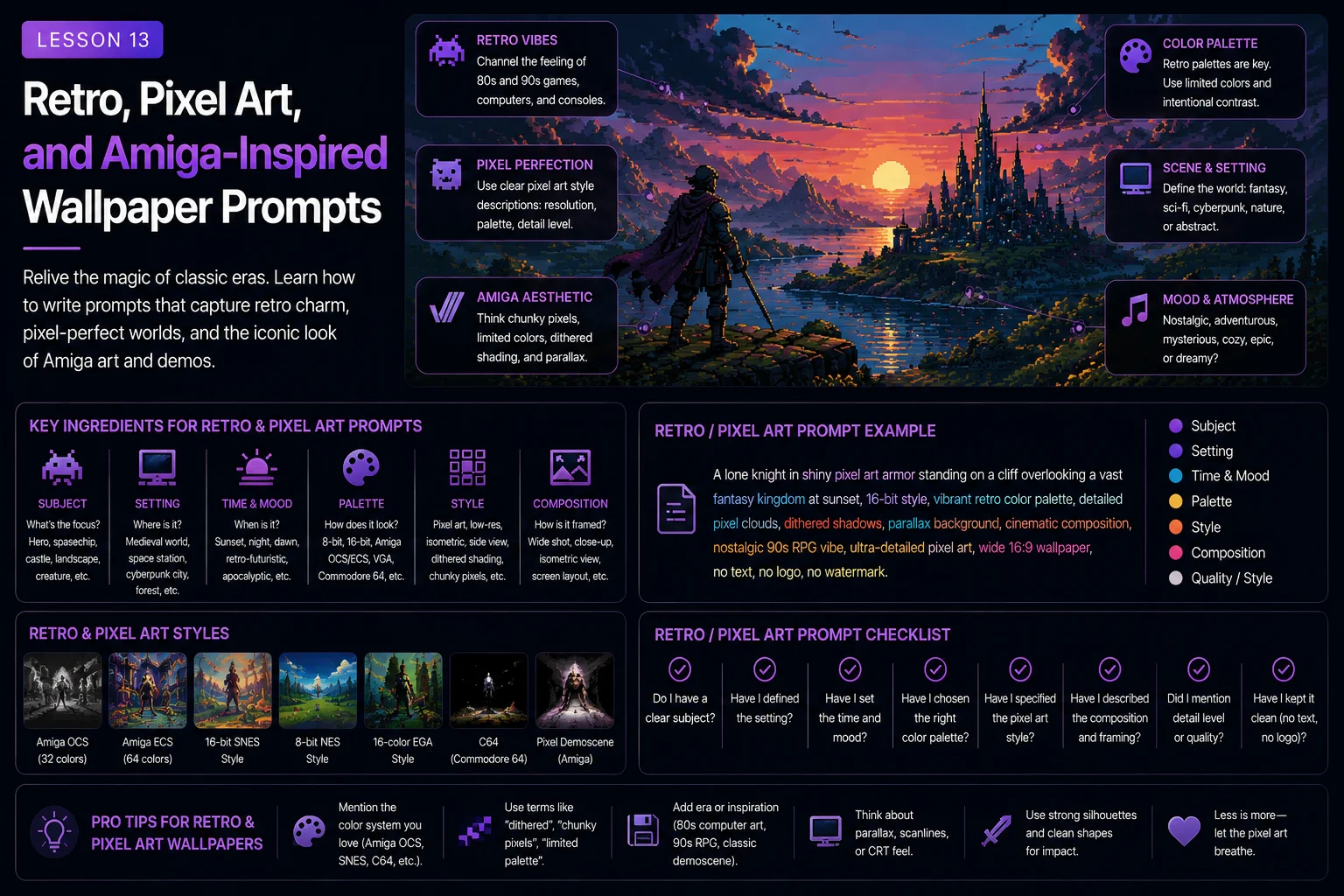
Retro, Pixel Art, and Amiga-Inspired Wallpaper Prompts
Retro and pixel art wallpapers have a special charm.
They can feel nostalgic, bold, readable, colorful, and full of personality. A good retro wallpaper can remind viewers of classic computer art, old game backgrounds, demo scene visuals, 16-bit graphics, limited palettes, copper gradients, crisp sprites, and early digital creativity.
But AI tools do not always understand pixel art correctly. If you simply ask for pixel art, the result may look like a normal image with a pixel filter. It may become blurry, over-detailed, noisy, or too modern. To create better retro wallpapers, you need to guide the AI with clear constraints.
In this lesson, you will learn how to write stronger retro, pixel art, and Amiga-inspired wallpaper prompts for Skinbase-ready artwork.
Why Retro Prompts Need Constraints
Retro computer art was shaped by limits.
Older computers and game systems could not display unlimited colors, huge resolutions, or complex photographic detail. Artists had to work with restricted palettes, sharp pixels, simple shapes, readable silhouettes, and clever composition.
That is why retro art has such a strong identity.
If your prompt only says:
pixel art spaceship
The AI may create something that looks vaguely pixelated, but not truly retro.
A stronger prompt adds constraints:
A retro 16-bit pixel art spaceship flying above an alien ocean, limited 32-color palette, crisp pixel edges, clean readable silhouette, wide 16:9 wallpaper composition, copper gradient sunset sky, nostalgic sci-fi mood, no text, no watermark.
The second prompt tells the AI how the image should behave visually.
Retro prompts work best when you describe the limits.
Pixel Art Is About Readability
Pixel art is not just low resolution. It is about clear shapes.
A good pixel-art wallpaper should still be readable when viewed as a thumbnail. The viewer should quickly understand the subject, scene, and mood.
Useful readability phrases:
crisp pixel edges
clean readable shapes
strong silhouette
simple background layers
clear subject outline
limited color palette
no noisy detail
no blurry pixel effect
clean low-resolution look
Weak prompt:
A super detailed pixel art city with thousands of windows, tiny people, vehicles, wires, signs, lights, smoke, stars, and holograms everywhere.
Better prompt:
A retro 16-bit pixel art city skyline at night, simple readable building shapes, limited color palette, large purple sky, glowing windows, wide 16:9 wallpaper composition, no readable text, no watermark.
The improved version is easier to read and more wallpaper-friendly.
Choose a Retro Direction
Retro art can mean many things. Be specific about the direction you want.
Common retro directions include:
8-bit game style
16-bit pixel art
Amiga-inspired computer art
classic demo scene visuals
retro sci-fi illustration
old-school fantasy game background
limited palette landscape
pixel-art character wallpaper
copper gradient sunset scene
low-resolution arcade atmosphere
Example:
A fantasy castle above a misty valley.
16-bit version:
A retro 16-bit pixel art fantasy castle above a misty valley, limited color palette, crisp pixel edges, clean sky, wide 16:9 wallpaper, nostalgic game background mood.
Amiga-inspired version:
An Amiga-inspired 16-bit computer art fantasy castle above a misty valley, limited 32-color palette, copper gradient sky, crisp pixel edges, wide 16:9 wallpaper, nostalgic demo scene atmosphere.
The subject is similar, but the style direction becomes more specific.
Use Palette Limits
Color limits are one of the best ways to make retro prompts feel more authentic.
Useful palette phrases:
limited color palette
limited 16-color palette
limited 32-color palette
restrained retro palette
clean color blocks
strong contrast
no modern photographic gradients
simple indexed-color look
nostalgic computer palette
Example:
A retro 16-bit pixel art ocean sunset, limited 32-color palette, orange and purple copper gradient sky, simple wave shapes, wide 16:9 wallpaper, crisp pixel edges, no text, no watermark.
A limited palette makes the image feel more controlled and less modern.
For Skinbase wallpapers, limited palettes also help create a strong visual identity.
Use Copper Gradients and Retro Skies
Classic computer art often used bold gradient skies and horizontal color bands.
Useful phrases:
copper gradient sky
horizontal retro gradient bands
smooth old-school color gradient
sunset gradient background
purple and orange gradient sky
blue-to-black night gradient
retro demo scene sky
Example:
A retro 16-bit pixel art mountain landscape, copper gradient sunset sky, dark mountain silhouettes, small lake reflection, limited 32-color palette, wide 16:9 wallpaper, crisp pixel edges, no text, no watermark.
Gradient skies are excellent for wallpapers because they create clean negative space.
Keep Composition Simple
Pixel art can become messy if the composition is too complex.
Good retro wallpaper composition often uses:
one clear subject
large sky area
simple horizon line
strong silhouette
clean foreground shapes
layered background
limited visual noise
subject placed on the right or left third
wide 16:9 layout
Example:
A retro 16-bit pixel art spaceship above an alien planet, spaceship placed in the upper-right third, planet horizon in the lower third, large starfield on the left, limited palette, crisp pixel edges, no text, no watermark.
This composition is simple, readable, and wallpaper-friendly.
Use Strong Silhouettes
Silhouette is especially important in retro art.
Because details are limited, the outer shape of the subject must be clear.
Useful silhouette phrases:
strong readable silhouette
clear subject outline
simple iconic shape
dark silhouette against bright sky
full subject visible
no cropped subject
clean outline
recognizable shape
Example:
A retro pixel art dragon flying across a full moon, strong readable silhouette, simple wing shape, limited color palette, wide 16:9 wallpaper composition, clean night sky, no text, no watermark.
Silhouette makes pixel art more powerful and easier to recognize.
Avoid Modern Over-Detailing
AI tools often add too much detail, even when you ask for retro art.
Too much detail can break the old-school feeling.
Weak prompt:
Ultra realistic pixel art with thousands of tiny details, cinematic ray tracing, volumetric lighting, 8K texture detail, photorealistic reflections.
This mixes modern rendering language with retro pixel art.
Better prompt:
Retro 16-bit pixel art landscape, limited 32-color palette, crisp pixel edges, simple readable shapes, clean composition, no modern photorealistic rendering, no text, no watermark.
For retro prompts, avoid terms such as:
photorealistic
ultra-realistic
ray tracing
8K texture detail
cinematic lens blur
realistic skin pores
hyper-detailed materials
Use retro-friendly words instead:
crisp pixels
limited palette
clean shapes
old-school computer art
low-resolution game background
simple shading
readable silhouettes
Amiga-Inspired Prompting
Amiga-inspired art can reference the feeling of classic 16-bit computer graphics, demo scene visuals, game backgrounds, copper gradients, and limited palettes.
Useful phrases:
Amiga-inspired computer art
classic 16-bit computer graphics
old-school demo scene atmosphere
limited 32-color palette
copper gradient sky
crisp pixel edges
clean low-resolution look
nostalgic computer art style
classic game background mood
Example:
An Amiga-inspired 16-bit computer art scene of a futuristic ocean at sunset, copper gradient sky, small spaceship silhouette, limited 32-color palette, crisp pixel edges, wide 16:9 wallpaper composition, nostalgic demo scene atmosphere, no text, no watermark.
This prompt focuses on the visual language without copying any specific copyrighted game, logo, or character.
Respect Originality
Retro inspiration is powerful, but your wallpapers should still feel original.
Avoid asking the AI to copy a specific copyrighted game screen, character, logo, box art, or exact artist style. Instead, describe the general visual qualities you want.
Better phrases:
inspired by classic 16-bit computer art
old-school fantasy game background mood
retro sci-fi pixel-art atmosphere
nostalgic demo scene style
Amiga-inspired color palette and pixel look
Avoid phrases that ask for exact copies of protected characters, game screenshots, or brand assets.
A Skinbase-ready wallpaper should feel inspired, not copied.
Retro Fantasy Wallpapers
Fantasy works very well in retro pixel art.
Useful fantasy retro subjects:
castle above a valley
dragon silhouette
wizard tower
enchanted forest
glowing portal
ancient ruins
moonlit kingdom
floating island
Example:
A retro 16-bit pixel art fantasy castle above a misty valley, limited 32-color palette, copper gradient sunrise sky, crisp pixel edges, castle placed on the right third, large open sky on the left, nostalgic fantasy game background mood, no text, no watermark.
Why it works:
The subject is clear.
The style is specific.
The palette is limited.
The composition is wallpaper-friendly.
The image has clean open space.
Retro Sci-Fi Wallpapers
Sci-fi and pixel art are a natural match.
Useful sci-fi retro subjects:
spaceship over a planet
alien ocean
space station
robot silhouette
futuristic city skyline
starfield
moon base
neon grid landscape
Example:
A retro 16-bit pixel art spaceship flying above a blue alien planet, limited 32-color palette, crisp pixel edges, spaceship in the upper-right third, planet horizon in the lower third, large clean starfield, nostalgic sci-fi atmosphere, no text, no watermark.
Why it works:
The spaceship has a clear silhouette.
The planet creates scale.
The starfield gives negative space.
The style constraints help the retro feeling.
Retro Nature Wallpapers
Retro nature wallpapers can feel calm and nostalgic.
Useful nature subjects:
mountain sunset
forest lake
ocean horizon
desert dunes
snowy mountains
waterfall
starry sky
autumn forest
Example:
A retro 16-bit pixel art mountain lake at sunset, limited color palette, crisp pixel edges, copper gradient sky, dark pine tree silhouettes, calm lake reflection, wide 16:9 wallpaper composition, no text, no watermark.
Nature scenes work well when the palette is controlled and the shapes are simple.
Retro Character Wallpapers
Character pixel art needs extra care because small anatomy details can become messy.
Useful character phrases:
full body visible
strong readable silhouette
simple character shape
limited color palette
crisp pixel edges
clean background
no cropped head
no extra limbs
no blurry pixels
Example:
A retro 16-bit pixel art space hero standing on an alien platform, full body visible, strong readable silhouette, limited 16-color palette, crisp pixel edges, large starfield background, wide 16:9 wallpaper composition, no text, no watermark.
For retro character wallpapers, simple poses usually work better than complex action scenes.
8-Bit vs. 16-Bit Style
8-bit and 16-bit prompts should not feel the same.
8-bit style usually works better with:
very simple shapes
blocky silhouettes
few colors
minimal detail
arcade-like clarity
bold contrast
16-bit style usually allows:
more colors
richer backgrounds
smoother shading
more detailed sprites
layered parallax-style scenes
stronger atmosphere
Example 8-bit prompt:
An 8-bit pixel art moonlit castle silhouette, limited 8-color palette, simple blocky shapes, dark sky, wide 16:9 wallpaper, clean composition, no text, no watermark.
Example 16-bit prompt:
A 16-bit pixel art moonlit castle above a misty valley, limited 32-color palette, layered mountains, copper gradient night sky, crisp pixel edges, wide 16:9 wallpaper, no text, no watermark.
Choose the level of detail that fits your idea.
Pixel Art Prompt Restrictions
Pixel art prompts often need restrictions to avoid blurry or modern results.
Useful restrictions:
no blurry pixels
no soft photo texture
no photorealistic rendering
no random text
no logos
no watermark
no modern 3D render look
no noisy detail
no anti-aliased blur
no realistic lens blur
Example:
A retro 16-bit pixel art forest waterfall, limited color palette, crisp pixel edges, clean readable shapes, wide 16:9 wallpaper, no blurry pixels, no photorealistic rendering, no text, no watermark.
Restrictions help keep the image closer to retro pixel art.
Common Retro Prompt Mistakes
Mistake 1: Only Saying Pixel Art
Weak:
Pixel art landscape.
Better:
Retro 16-bit pixel art mountain landscape, limited 32-color palette, crisp pixel edges, copper gradient sky, wide 16:9 wallpaper, no text, no watermark.
Mistake 2: Too Much Modern Rendering Language
Weak:
Pixel art with ray tracing, photorealistic lighting, 8K textures, realistic depth of field.
Better:
Pixel art with simple shading, strong silhouettes, limited palette, clean background layers, crisp pixel edges.
Mistake 3: Too Many Tiny Details
Weak:
A pixel art city with thousands of windows, cars, signs, people, wires, lights, smoke, robots, and holograms everywhere.
Better:
A retro pixel art city skyline with simple building shapes, glowing windows, large gradient sky, limited color palette, wide 16:9 wallpaper.
Mistake 4: No Palette Direction
Weak:
Retro fantasy wallpaper.
Better:
Retro fantasy wallpaper with a limited 32-color palette, warm copper sky, dark blue mountains, and golden castle lights.
Mistake 5: Blurry Pixel Look
Weak:
Pixelated digital painting.
Better:
Crisp pixel art, clean square pixels, no blurry pixel filter, no soft photographic texture.
Before and After Example
Basic prompt:
A retro spaceship wallpaper.
Improved prompt:
A retro 16-bit pixel art spaceship flying above a blue alien planet, limited 32-color palette, crisp pixel edges, spaceship placed in the upper-right third, planet horizon in the lower third, large clean starfield on the left, copper gradient glow near the horizon, nostalgic sci-fi computer art mood, wide 16:9 wallpaper composition, no text, no logo, no watermark, no blurry pixels.
The improved prompt adds:
Specific retro style
Palette limit
Pixel clarity
Composition
Negative space
Mood
Restrictions
This makes the image more likely to feel like a real retro wallpaper.
Beginner Retro Prompt Formula
Use this formula when writing retro, pixel art, or Amiga-inspired wallpaper prompts:
Subject + retro style + palette limit + pixel clarity + composition + background space + mood + restrictions
Example:
A fantasy castle above a misty valley, Amiga-inspired 16-bit computer art style, limited 32-color palette, crisp pixel edges, wide 16:9 wallpaper composition, castle placed on the right third, copper gradient sunset sky with clean open space on the left, nostalgic fantasy mood, no text, no logo, no watermark, no blurry pixels.
This formula keeps the retro look focused and screen-friendly.
Quick Retro Prompt Starters
Use these starters when you need ideas.
Retro fantasy castle:
A retro 16-bit pixel art fantasy castle above a misty valley, limited 32-color palette, copper gradient sky, crisp pixel edges, wide 16:9 wallpaper, no text, no watermark.
Amiga-inspired sci-fi ocean:
An Amiga-inspired 16-bit computer art sci-fi ocean at sunset, copper gradient sky, small spaceship silhouette, limited 32-color palette, crisp pixel edges, wide 16:9 wallpaper, no text, no watermark.
Pixel art spaceship:
A retro 16-bit pixel art spaceship flying above a blue alien planet, large starfield, limited color palette, crisp pixel edges, wide 16:9 wallpaper, no text, no watermark.
Retro forest:
A retro pixel art forest lake at night, moonlit pine silhouettes, limited color palette, clean water reflection, crisp pixel edges, wide 16:9 wallpaper, no text, no watermark.
8-bit castle:
An 8-bit pixel art castle silhouette under a full moon, limited 8-color palette, simple blocky shapes, clean night sky, wide 16:9 wallpaper, no text, no watermark.
16-bit character:
A retro 16-bit pixel art space hero standing on an alien platform, full body visible, strong readable silhouette, limited palette, crisp pixel edges, wide 16:9 wallpaper, no text, no watermark.
Skinbase Creator Tip
Retro wallpapers are easier to present on Skinbase when the style and constraints are clear.
Useful tags might include:
pixel-art
retro
16-bit
8-bit
amiga
sci-fi
fantasy
game-art
nostalgia
limited-palette
Choose tags that match the actual image. If the image is a retro spaceship, use pixel-art, retro, spaceship, and sci-fi. If it is an Amiga-inspired fantasy castle, use amiga, 16-bit, fantasy, castle, and pixel-art.
Clear style direction makes the artwork easier to discover and understand.
Practice Exercise
Start with this simple idea:
A spaceship over an alien planet.
Now improve it step by step.
Add retro style:
A retro 16-bit pixel art spaceship over an alien planet.
Add palette and pixel clarity:
A retro 16-bit pixel art spaceship over an alien planet, limited 32-color palette, crisp pixel edges.
Add composition:
A retro 16-bit pixel art spaceship over an alien planet, limited 32-color palette, crisp pixel edges, wide 16:9 wallpaper composition, spaceship placed in the upper-right third, planet horizon in the lower third.
Add mood and restrictions:
A retro 16-bit pixel art spaceship over an alien planet, limited 32-color palette, crisp pixel edges, wide 16:9 wallpaper composition, spaceship placed in the upper-right third, planet horizon in the lower third, large clean starfield on the left, nostalgic sci-fi mood, no text, no logo, no watermark, no blurry pixels.
Now create your own retro wallpaper prompt.
Try one of these:
fantasy castle
alien ocean
pixel art forest
retro dragon
space hero
mountain sunset
neon city skyline
Amiga-inspired abstract waves
Keep the style clear, the palette limited, and the composition readable.
Key Takeaways
Retro and pixel art wallpaper prompts work best when they include clear visual constraints.
To write stronger retro prompts:
Choose a specific retro direction.
Use limited palette language.
Ask for crisp pixel edges.
Keep shapes simple and readable.
Use strong silhouettes.
Avoid modern photorealistic rendering terms.
Use clean composition and negative space.
Add restrictions against blur, fake text, logos, and watermarks.
Keep the final image original and Skinbase-ready.
A great retro wallpaper prompt does not only say pixel art. It describes the limits, mood, palette, composition, and clarity that make retro art feel authentic.
In the next lesson, you will learn how negative prompts and problem-solving phrases can help reduce common AI image issues such as bad anatomy, artifacts, text, watermarks, clutter, and bad cropping.
Lesson navigation
Continue in order
Previous lesson
Wallpaper Prompt Engineering for Skinbase Creators · Lesson 12
Writing Better Character Wallpapers
Learn how to create better AI character wallpapers with stronger poses, cleaner anatomy, safer cropping, and more readable composition.
Next lesson
Wallpaper Prompt Engineering for Skinbase Creators · Lesson 14
Negative Prompts and Common AI Image Problems
Learn how to use negative prompts and prevention phrases to reduce common AI image problems in wallpaper artwork.