
Article
Lesson content
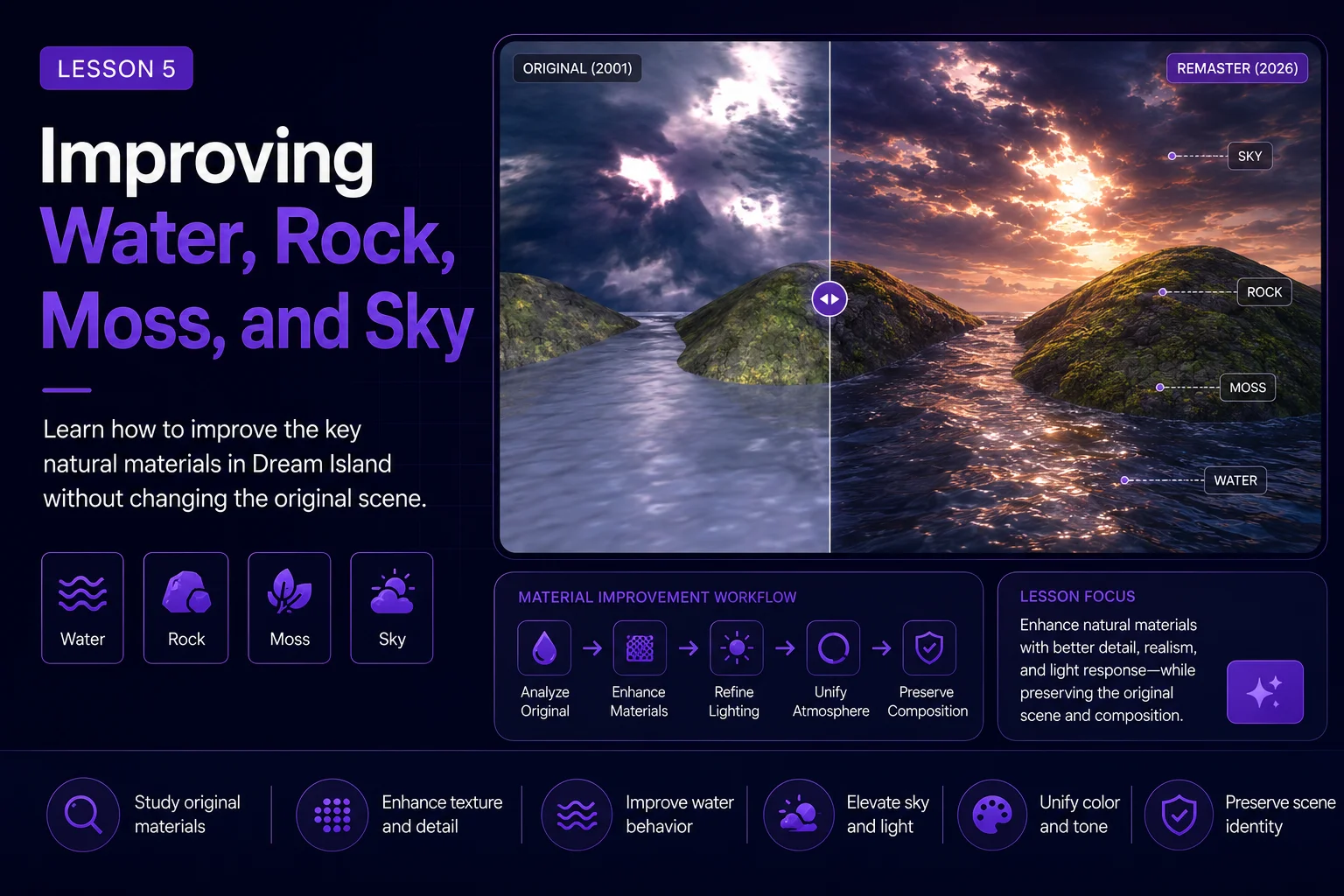
Improving Water, Rock, Moss, and Sky
After creating a faithful AI remaster, the next step is to improve the most important visual materials in the image. For Dream Island, those materials are water, rock, moss, and sky.
These elements define the mood of the artwork. If they are weak, the image feels flat. If they are improved carefully, the whole scene becomes more cinematic, believable, and wallpaper-ready without needing to change the composition.
This lesson focuses on targeted improvement. Instead of asking AI to redesign the whole scene, we guide it to strengthen the natural surfaces and atmosphere that already exist in the original artwork.
Why Materials Matter
A landscape image becomes convincing when its materials feel connected to light, weather, and environment.
In Dream Island, the scene depends on four main systems:
reflective water
wet rocky islands
green moss and vegetation
dramatic cloudy sky
These systems work together. The sky reflects in the water. The wet rocks respond to the light. The moss softens the hard island shapes. The clouds create scale, depth, and drama.
Improving these elements is more effective than adding random new objects.
Start with Controlled Material Goals
Before writing a prompt, define what each material should do.
For Dream Island, the goals can be:
water should feel reflective, deep, and slightly moving
rock should feel wet, detailed, heavy, and natural
moss should feel organic, soft, and varied
sky should feel dramatic, layered, and atmospheric
This gives the AI a clear improvement direction.
The goal is not to make everything extremely detailed. The goal is to make the scene feel more believable while preserving the original visual identity.
Improving the Water
The water is one of the most important parts of Dream Island. It fills the foreground and reflects the sky, helping the viewer move into the scene.
In the original image, the water is atmospheric but simple. In the remaster, we can improve it with:
subtle wave patterns
soft reflections
darker depth near rocks
light ripples
foam near stone edges
better connection to the sky color
natural surface variation
Avoid making the water too rough. Dream Island should still feel calm, mysterious, and dreamlike.
A useful water-focused prompt line:
text Improve the water with natural reflective ripples, subtle wave movement, soft foam near the rocks, deeper blue-gray tones, and realistic reflections of the dramatic sky.
Improving the Rocks
The rocky islands are the main physical structure of the image. They need to feel solid and natural.
A good remaster can improve the rocks with:
sharper cracks
wet stone surfaces
layered rock forms
darker shadow areas
natural erosion
better highlights where light hits the edges
more believable contact with water
Avoid making the rocks too sharp, too metallic, or too artificial. They should feel like natural island rocks, not fantasy crystal formations or plastic sculpture.
A useful rock-focused prompt line:
text Enhance the rocky islands with detailed wet stone texture, natural cracks, eroded edges, subtle shadow depth, and realistic highlights from the sunset sky.
Improving the Moss
The moss gives Dream Island its green identity. It softens the rocks and makes the island feel alive.
The moss should not become a thick cartoon carpet. It should feel natural, uneven, and connected to the stone surface.
Improve it with:
varied green tones
soft organic patches
small grass-like details
darker moss in shadow
brighter moss on light-facing surfaces
natural blending into the rocks
A useful moss-focused prompt line:
text Add natural moss variation across the rocky surfaces, with soft green patches, small vegetation detail, darker shadow moss, and subtle highlights where the sunset light touches the island.
Improving the Sky
The sky controls the emotional tone of the image. In Dream Island, the dramatic cloudy sky is part of the artwork’s identity.
A good remaster can improve the sky with:
layered storm clouds
warm light breaks
atmospheric depth
soft sunset glow
richer cloud texture
stronger contrast between light and shadow
subtle haze near the horizon
Avoid turning the sky into a completely different scene. Do not add meteors, magical portals, lightning storms, or extreme fantasy effects yet. Those belong to later creative reinterpretation lessons.
A useful sky-focused prompt line:
text Create a deeper cinematic sky with layered clouds, soft sunset glow, atmospheric haze, and dramatic light breaks while preserving the original mysterious mood.
Combined Material Prompt
After defining each material, combine the improvements into one controlled prompt.
text Enhance the faithful Dream Island remaster by improving only the natural materials and atmosphere. Keep the original island layout, water channel, low camera angle, and dramatic landscape composition. Improve the water with reflective ripples, subtle wave movement, soft foam near the rocks, and realistic sky reflections. Enhance the rocky islands with detailed wet stone texture, natural cracks, eroded edges, and believable shadows. Add varied green moss and small organic vegetation patches that blend naturally into the rocks. Create a deeper cinematic sky with layered clouds, soft sunset glow, atmospheric haze, and dramatic light breaks. Keep the mood mysterious, calm, cinematic, and wallpaper-ready.
This prompt is specific enough to guide improvement, but still restrained enough to protect the scene.
Negative Prompt
Use a negative prompt to prevent unwanted creative changes.
text no village, no houses, no boats, no bridge, no people, no animals, no castle, no meteors, no magical portal, no lightning storm, no readable text, no logo, no watermark, no plastic water, no metallic rocks, no cartoon moss, no oversaturated colors, no different camera angle, no completely new island layout
The negative prompt reminds the AI that this lesson is about materials, not storytelling.
Work in Passes
If your AI tool supports multiple generations or masking, improve the image in passes.
A useful order is:
Improve water and reflections.
Improve rocks and moss.
Improve sky and atmosphere.
Generate a final combined version.
This makes the workflow easier to control. If you ask for every improvement at once, the AI may change too much of the scene.
Using Masks or Regional Editing
Some tools allow you to edit only one part of the image. This is useful for material refinement.
You can mask:
only the water
only the rocks
only the mossy surfaces
only the sky
Regional editing helps protect the composition. For example, you can improve the water without accidentally changing the island shape.
When masking, keep the prompt focused on the selected area. Do not describe the whole scene if you are only improving the sky.
What Makes the Result Successful?
A successful material pass should feel richer, but not overloaded.
Look for:
water that reflects the sky naturally
rocks that feel wet and detailed
moss that looks organic, not painted on
sky that adds drama without stealing attention
lighting that connects all materials together
scene structure that still matches the original Dream Island image
The result should feel like the same landscape with better rendering quality.
Common Problems
The Water Looks Like Plastic
If the water becomes too smooth or glossy, add terms like:
natural ripples
subtle surface variation
realistic water movement
soft reflections
Remove terms that push it toward a shiny artificial look.
The Rocks Become Too Fantasy-Like
If the rocks turn into crystals, cliffs, or unrealistic shapes, strengthen the prompt with:
natural island rocks
eroded stone
realistic geology
preserve original rock shapes
The Moss Looks Like Bright Green Paint
If the moss becomes too saturated, use:
muted green tones
natural moss variation
uneven organic patches
subtle vegetation detail
The Sky Changes the Whole Mood
If the sky becomes too bright, too magical, or too stormy, guide it back with:
mysterious cloudy sky
soft sunset glow
restrained cinematic atmosphere
preserve original mood
Compare Before and After
Place the faithful remaster next to the material-improved version.
Ask:
Are the materials more believable?
Does the image still feel like Dream Island?
Did the AI preserve the main island shapes?
Is the water still calm and reflective?
Does the sky support the scene instead of overpowering it?
Are the colors richer but still tasteful?
If the answer is yes, the material pass worked.
Save the Material Version
Use a clear file name so you can track the workflow.
Example:
dream-island-2026-material-pass-v1
dream-island-2026-water-rock-moss-sky-v2
dream-island-2026-material-pass-selected
Also save the prompt, negative prompt, and settings. This makes the process repeatable and useful for later Academy lessons.
Lesson Takeaway
Improving materials is one of the safest ways to make an old artwork feel modern. Water, rock, moss, and sky can all become richer and more cinematic without changing the original composition.
For Dream Island, this step strengthens the image’s natural world. The scene now has more depth, texture, reflection, and atmosphere while still respecting the 2001 source.
In the next lesson, we will expand the environment further by adding atmosphere and forest detail without losing the original island structure.
Lesson navigation
Continue in order
Previous lesson
AI Remaster Lab: Dream Island 2001 → 2026 · Lesson 04
Creating a Faithful AI Remaster
Create the first AI-enhanced version of Dream Island while keeping the original composition, mood, and visual identity intact.
Next lesson
AI Remaster Lab: Dream Island 2001 → 2026 · Lesson 06
Expanding the Scene with Atmosphere and Forest
Learn how to add depth, forest detail, mist, and atmosphere while keeping the Dream Island composition intact.