
Article
Lesson content
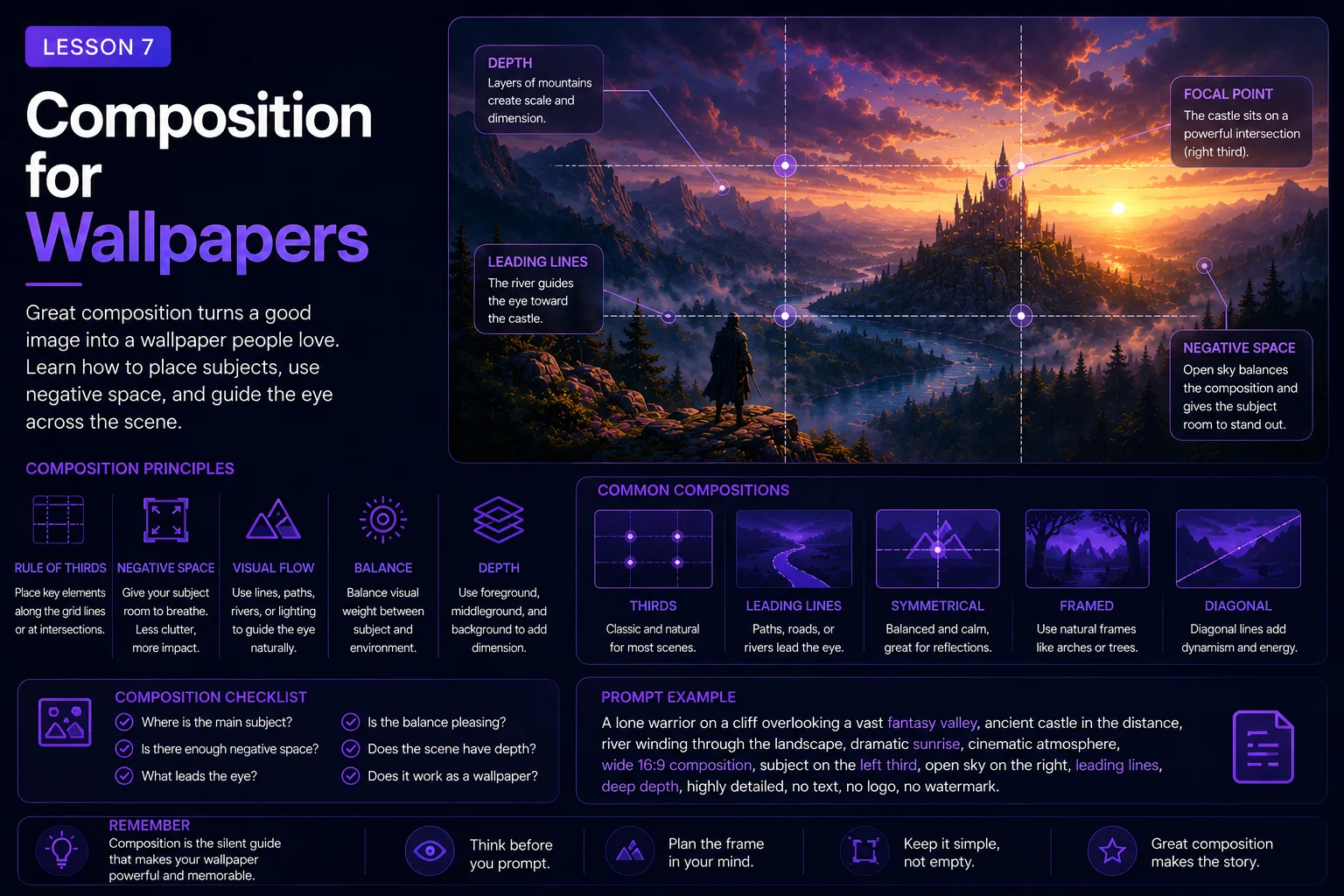
Composition for Wallpapers
Composition is how the parts of an image are arranged inside the frame.
For wallpaper prompts, composition is one of the most important skills to learn. A beautiful subject can still fail as a wallpaper if it is placed badly, cropped awkwardly, or surrounded by too much clutter.
A strong wallpaper composition helps the image feel clear, balanced, and usable. It guides the viewer’s eye, creates space for icons or widgets, protects the main subject from bad cropping, and makes the final artwork feel intentional.
In this lesson, you will learn how to use composition words in AI prompts to create better wallpapers for Skinbase.
Why Composition Matters
Many beginner prompts focus only on what should appear in the image.
Example:
A dragon flying above a castle.
This describes the subject, but it does not explain how the image should be arranged.
The AI may place the dragon too close to the edge, crop the wings, hide the castle, fill the sky with clutter, or create a scene that looks more like a poster than a wallpaper.
A composition-aware prompt gives better direction:
A dragon flying above a distant castle, wide 16:9 desktop wallpaper composition, dragon placed in the upper-right third, castle in the lower-left distance, large open sky, strong readable silhouette, detailed but uncluttered, no text, no watermark.
Now the AI has layout guidance. The result is more likely to feel like a wallpaper instead of a random fantasy image.
Think in Terms of the Frame
When writing a wallpaper prompt, imagine the image frame before generating.
Ask yourself:
-
Where is the main subject?
-
Is the subject close or distant?
-
Is there open space?
-
Where will the viewer look first?
-
Is the image balanced?
-
Is anything important too close to the edge?
-
Does the image work as a desktop or mobile background?
A prompt should not only describe objects. It should describe placement.
Useful placement phrases:
-
centered subject
-
subject slightly off-center
-
subject placed on the right third
-
subject placed on the left third
-
subject in the lower third
-
distant subject near the horizon
-
large open sky above
-
clean space on the left
-
full subject visible inside the frame
-
safe margins around the subject
These phrases help the AI understand the layout.
Use Wide Composition for Desktop Wallpapers
Most desktop wallpapers are wide. A wide layout gives the image a cinematic feeling and creates space for background elements.
Useful phrases:
-
wide 16:9 desktop wallpaper composition
-
cinematic landscape composition
-
panoramic wallpaper framing
-
horizontal wide-angle view
-
expansive landscape layout
-
wide screen-friendly composition
Example:
A peaceful mountain lake at sunrise, wide 16:9 desktop wallpaper composition, mountains in the distance, lake reflection across the lower half, large open sky above, soft golden light, realistic digital painting style, no text, no watermark.
This prompt gives the AI a clear desktop format.
If you want a mobile wallpaper, use a different composition phrase:
vertical 9:16 mobile wallpaper composition, centered subject, clean top area for lock-screen text.
The aspect ratio changes the composition, so always include it when the final use matters.
The Rule of Thirds
The rule of thirds is a simple composition idea. Imagine the image divided into three equal parts horizontally and vertically. Important subjects are often placed near those lines or intersections instead of directly in the center.
For prompts, you can use phrases like:
-
subject on the right third
-
subject on the left third
-
castle placed in the lower-right third
-
character placed on the left third
-
horizon on the lower third
-
city skyline in the lower third
Example:
A lone astronaut standing on a red desert planet, wide 16:9 sci-fi wallpaper composition, astronaut placed on the right third, huge planet rising in the left sky, clean open space between them, cinematic lighting, no text, no watermark.
This creates a more designed layout than simply saying:
An astronaut on Mars.
The rule of thirds often makes wallpapers feel more cinematic and less static.
Centered Composition
Centered composition places the main subject in the middle of the image.
This can work very well when the subject is symmetrical, iconic, distant, or powerful.
Good centered subjects include:
-
A glowing portal
-
A mountain peak
-
A fantasy castle
-
A lonely tree
-
A spaceship seen from behind
-
A road leading into the distance
-
A circular abstract shape
-
A character silhouette
Example:
A glowing magical portal in ancient forest ruins, centered composition, wide 16:9 desktop wallpaper, symmetrical stone arches, soft blue light, misty background, clean foreground, no text, no watermark.
Centered composition can feel strong and memorable, but be careful with desktop icons. If the subject fills the center too much, the wallpaper may feel more like a poster.
Off-Center Composition
Off-center composition places the subject away from the middle. This often creates more natural, usable wallpapers.
Useful phrases:
-
subject slightly off-center
-
subject placed on the right third
-
subject placed on the left third
-
asymmetrical balanced composition
-
large negative space opposite the subject
Example:
A white wolf standing on a snowy ridge, wide 16:9 wallpaper composition, wolf placed slightly right of center, large moonlit sky on the left, distant pine forest, calm winter atmosphere, no cropped body, no text, no watermark.
Off-center composition is especially useful when you want clean space for desktop icons.
Negative Space
Negative space is the calmer, simpler area around the subject.
It can be empty sky, fog, water, shadow, snow, desert, a smooth gradient, or a soft blurred background.
Negative space helps wallpapers feel usable and elegant.
Useful phrases:
-
large clean sky area
-
calm negative space
-
open space on the left
-
simple atmospheric background
-
uncluttered foreground
-
soft gradient background
-
clean dark space for desktop icons
Example:
A small spaceship flying above a blue alien planet, wide 16:9 desktop wallpaper, spaceship placed in the upper-right third, large dark starfield as negative space on the left, subtle nebula glow, clean readable silhouette, no text, no logo, no watermark.
Negative space does not make an image boring. It gives the image room to breathe.
Foreground, Midground, and Background
A strong wallpaper often has depth.
Depth can be created by separating the image into foreground, midground, and background.
Foreground: The closest part of the image.
Midground: The main subject or central area.
Background: The distant environment.
Example:
A fantasy valley at sunrise, mossy rocks and flowers in the foreground, glowing castle in the midground, distant mountains in the background, wide 16:9 wallpaper composition, soft golden light, atmospheric depth, no text, no watermark.
This gives the AI a layered structure.
Useful depth phrases:
-
foreground rocks
-
distant mountains
-
atmospheric depth
-
layered background
-
soft depth haze
-
clear foreground, midground, and background
-
distant lights
-
path leading into the scene
Depth makes wallpapers feel richer without requiring clutter.
Leading Lines
Leading lines are shapes that guide the viewer’s eye through the image.
They can be roads, rivers, paths, bridges, light beams, railway tracks, city streets, or rows of trees.
Useful phrases:
-
path leading into the distance
-
river guiding the eye toward the mountains
-
road leading toward the city skyline
-
light beams pointing toward the subject
-
bridge leading to the castle
-
strong perspective lines
Example:
A quiet forest path leading toward a glowing ancient tree, wide 16:9 desktop wallpaper composition, path starts in the lower center and leads into the distance, soft morning fog, magical calm atmosphere, no text, no watermark.
Leading lines make the composition feel more intentional.
Horizon Placement
The horizon line affects how the image feels.
A low horizon creates more sky and can feel open, epic, or peaceful.
A high horizon creates more foreground and can feel immersive or grounded.
Useful phrases:
-
low horizon line with large open sky
-
high horizon line with detailed foreground
-
clean straight horizon
-
city skyline in the lower third
-
mountains along the lower third
-
ocean horizon centered calmly
Example:
A futuristic city skyline at sunset, wide 16:9 desktop wallpaper, city placed along the lower third, large clean orange and violet sky above, soft atmospheric glow, no text, no watermark.
This creates a useful wallpaper layout with space above the city.
Safe Margins Around the Subject
AI tools sometimes crop important parts of the subject. This is especially common with characters, animals, vehicles, wings, weapons, and tall buildings.
Use safe margin instructions when the subject must stay complete.
Useful phrases:
-
full body visible
-
complete subject inside the frame
-
safe margins around the subject
-
no cropped head
-
no cut-off limbs
-
no cropped wings
-
no subject touching the edge
-
full vehicle visible
-
entire castle visible
Example:
A heroic fantasy warrior standing on a rocky mountain pass, wide 16:9 wallpaper composition, full body visible with safe margins, subject placed on the right third, distant kingdom in the background, dramatic sunset rim lighting, no cropped head, no extra limbs, no text, no watermark.
This helps reduce awkward cropping.
Avoid Clutter Near the Edges
Wallpapers often look better when the edges are calmer.
Busy edges can distract the viewer and make the image feel crowded. They can also interfere with icons, menus, or screen UI.
Useful phrases:
-
uncluttered edges
-
clean border areas
-
no clutter near the edges
-
simple background around the frame
-
subject not touching the frame edges
-
calm space around the subject
Example:
A glowing fantasy tower rising from a misty valley, wide 16:9 desktop wallpaper, tower centered in the distance, large open sky, soft fog, clean edges, detailed but uncluttered, no text, no watermark.
Clean edges often make the image feel more professional.
Balance Detail and Empty Space
A wallpaper can have detail, but the detail should be controlled.
Too much detail everywhere creates visual noise. Too little detail can feel empty. The goal is balance.
A useful prompt phrase is:
detailed but uncluttered
Other helpful phrases:
-
rich detail in the main subject
-
simple atmospheric background
-
detailed focal point, clean surrounding space
-
subtle background detail
-
balanced visual density
-
calm negative space
Example:
A detailed fantasy castle with glowing windows, wide 16:9 desktop wallpaper, castle placed on the right third, simple misty valley and open sky around it, detailed focal point with clean surrounding space, no text, no watermark.
This tells the AI where detail should be concentrated.
Composition for Character Wallpapers
Character wallpapers need extra care because AI tools often crop heads, hands, feet, weapons, or hair.
Useful character composition phrases:
-
full body visible
-
head and shoulders fully inside the frame
-
centered portrait with safe margins
-
character placed on the right third
-
clean background behind the face
-
strong readable silhouette
-
no cropped head
-
no cut-off hands
-
no extra limbs
-
no distorted face
Example:
A sci-fi explorer standing on a desert planet, wide 16:9 desktop wallpaper, full body visible with safe margins, character placed on the left third, large alien sky on the right, clean cinematic background, strong silhouette, no cropped head, no extra limbs, no text, no watermark.
For character wallpapers, composition should protect the subject and keep the background clean.
Composition for Landscape Wallpapers
Landscape wallpapers usually need strong depth, clean horizon placement, and atmosphere.
Useful landscape composition phrases:
-
wide panoramic view
-
mountains in the distance
-
lake reflection in the foreground
-
path leading into the scene
-
large open sky
-
horizon on the lower third
-
atmospheric depth
-
clean foreground
Example:
A peaceful alpine lake at sunrise, wide panoramic 16:9 desktop wallpaper, lake reflection in the foreground, pine forest in the midground, snow mountains in the background, large open sky, soft mist, realistic digital painting, no text, no watermark.
Landscape prompts work best when you describe layers and light.
Composition for Sci-Fi Wallpapers
Sci-fi wallpapers often include cities, planets, spaceships, robots, or futuristic structures. These can become very busy, so composition is important.
Useful sci-fi composition phrases:
-
city skyline in the lower third
-
large starfield as negative space
-
spaceship placed in the upper-right third
-
clean dark sky
-
sharp silhouette
-
distant glowing city
-
balanced neon lighting
-
uncluttered futuristic shapes
Example:
A futuristic city skyline at night, wide 16:9 desktop wallpaper, city placed in the lower third, large clean sky above with subtle flying vehicles, neon blue and violet lighting, sharp architectural silhouettes, detailed but uncluttered, no readable text, no logos, no watermark.
Sci-fi images often generate random text, so restrictions are useful.
Composition for Pixel Art Wallpapers
Pixel art compositions need clarity. Small shapes can become unreadable if the image is too crowded.
Useful pixel-art composition phrases:
-
crisp readable silhouette
-
simple background layers
-
wide 16:9 pixel art wallpaper
-
limited color palette
-
clean horizon line
-
large sky area
-
clear foreground shapes
-
no noisy detail
Example:
A retro 16-bit pixel art spaceship above an alien ocean, wide 16:9 wallpaper composition, spaceship placed in the upper-right third, planet horizon in the lower third, large starfield area, limited color palette, crisp pixel edges, no text, no watermark.
Pixel art works best when the composition is simple and readable.
Before and After Example
Basic prompt:
A cyberpunk city wallpaper.
This may create a nice image, but it gives no layout direction.
Improved prompt:
A rainy cyberpunk city skyline at night, wide 16:9 desktop wallpaper composition, city placed in the lower third, large clean dark sky above, neon blue and pink reflections on wet rooftops, one small flying vehicle in the upper-right third, cinematic atmosphere, detailed but uncluttered, no readable text, no logos, no watermark.
The improved version controls:
-
Aspect ratio
-
Horizon placement
-
Negative space
-
Detail placement
-
Mood
-
Restrictions
This makes the image more wallpaper-friendly.
Beginner Composition Formula
Use this formula when writing composition-aware wallpaper prompts:
Subject + scene + aspect ratio + subject placement + negative space + depth or horizon + style + restrictions
Example:
A lonely lighthouse on a rocky coast, wide 16:9 desktop wallpaper composition, lighthouse placed on the right third, large open stormy sky on the left, ocean waves in the foreground, distant horizon line, cinematic blue-gray lighting, realistic digital painting style, no text, no logo, no watermark.
This formula helps you design the image instead of only describing it.
Skinbase Creator Tip
When preparing wallpapers for Skinbase, composition affects how your artwork appears everywhere:
-
Full wallpaper view
-
Gallery thumbnail
-
Featured cards
-
Search results
-
Mobile previews
-
Social sharing cards
A strong composition should still read well when the image becomes smaller. If the subject disappears in a thumbnail, the composition may be too weak or too busy.
Before uploading, check:
-
Is the main subject readable in a small preview?
-
Is anything important cropped?
-
Does the image have clean space?
-
Does the layout feel balanced?
-
Does it still work as a wallpaper, not just an artwork?
Good composition helps your image feel more professional on Skinbase.
Practice Exercise
Start with this simple idea:
A castle in the mountains.
Now improve the composition step by step.
Add aspect ratio:
A castle in the mountains, wide 16:9 desktop wallpaper composition.
Add placement:
A castle in the mountains, wide 16:9 desktop wallpaper composition, castle placed on the right third.
Add negative space:
A castle in the mountains, wide 16:9 desktop wallpaper composition, castle placed on the right third, large open sky on the left.
Add depth and mood:
A castle in the mountains, wide 16:9 desktop wallpaper composition, castle placed on the right third, large open sky on the left, misty valley below, distant peaks, soft golden sunrise lighting.
Final prompt:
A glowing fantasy castle built into a mountain cliff, wide 16:9 desktop wallpaper composition, castle placed on the right third, large open sky on the left, misty valley below, distant peaks in the background, soft golden sunrise lighting, cinematic fantasy digital painting style, detailed but uncluttered, no text, no logo, no watermark.
Now choose your own subject and write three composition versions:
-
Centered composition
-
Right-third composition
-
Large negative space composition
Compare how each version changes the image.
Key Takeaways
Composition controls how the image is arranged inside the frame.
For wallpaper prompts, good composition helps create images that are:
-
Clear
-
Balanced
-
Readable
-
Screen-friendly
-
Less cluttered
-
Less likely to crop important subjects
-
More useful as desktop or mobile backgrounds
Use prompt phrases for subject placement, aspect ratio, negative space, horizon, safe margins, and depth.
A strong composition can turn a simple image idea into a polished Skinbase-ready wallpaper.
In the next lesson, you will learn how lighting and color palettes shape the mood, readability, and visual impact of your AI wallpapers.
Lesson navigation
Continue in order
Previous lesson
Wallpaper Prompt Engineering for Skinbase Creators · Lesson 06
Style Direction: Digital Art, Fantasy, Sci-Fi, Pixel Art, and More
Learn how to guide AI image style clearly for digital art, fantasy, sci-fi, pixel art, retro scenes, and other wallpaper genres.
Next lesson
Wallpaper Prompt Engineering for Skinbase Creators · Lesson 08
Lighting and Color Palettes
Learn how to use lighting and color palettes to improve the mood, readability, and visual impact of AI wallpapers.