
Article
Lesson content
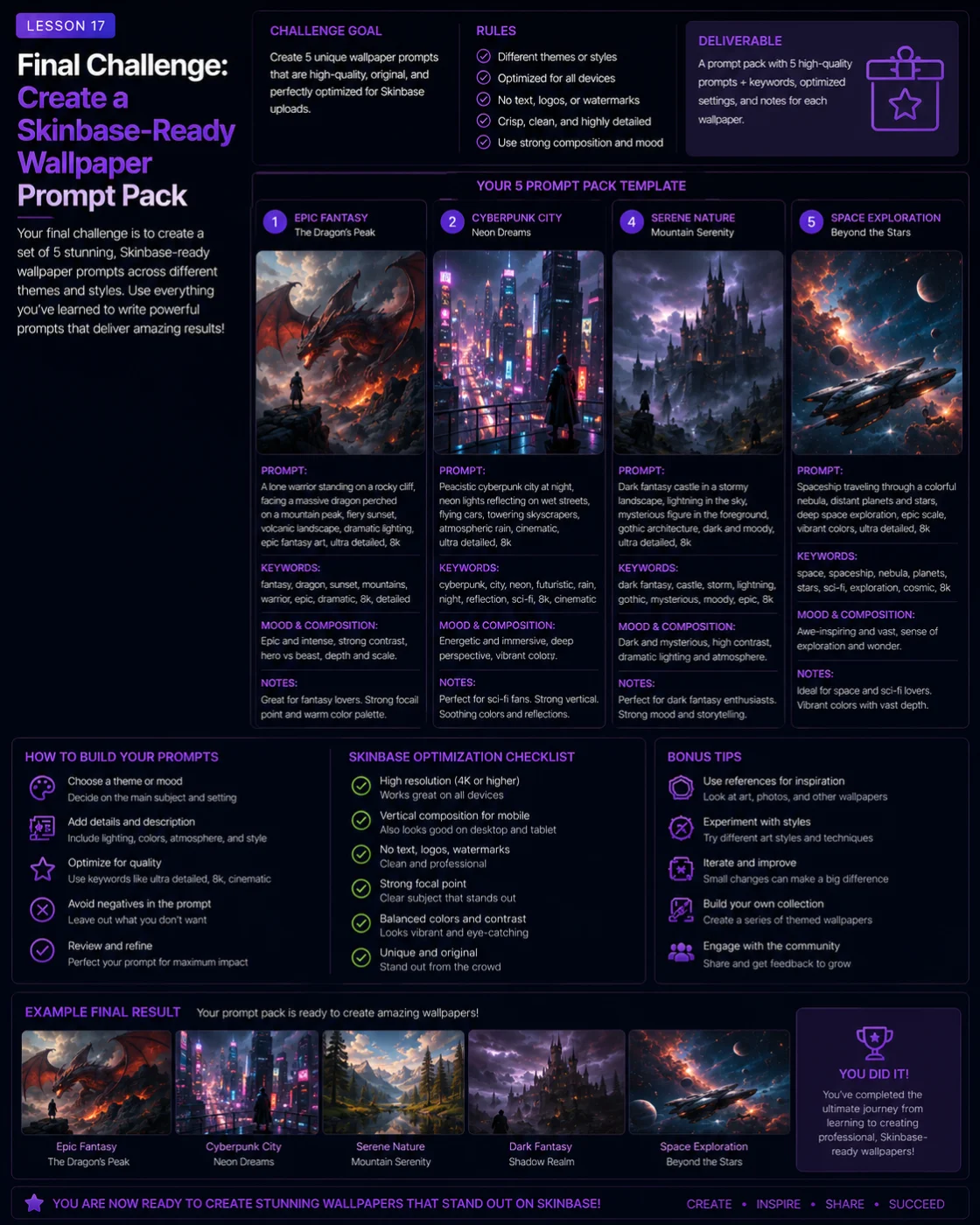
Final Challenge: Create a Skinbase-Ready Wallpaper Prompt Pack
You have learned how to build stronger AI wallpaper prompts step by step.
You now know how to control subject, scene, mood, style, composition, lighting, color, negative prompts, iteration, and upload preparation. The final challenge brings everything together.
In this lesson, you will create a small Skinbase-ready wallpaper prompt pack. A prompt pack is a collection of complete prompts built around a clear theme, style, or creative direction.
Your goal is not only to write random prompts. Your goal is to create prompts that could produce clean, usable, polished wallpapers suitable for Skinbase.
What Is a Wallpaper Prompt Pack?
A wallpaper prompt pack is a group of related AI image prompts.
Each prompt should be complete enough to generate a strong wallpaper on its own, but the pack should also feel connected.
A prompt pack can be connected by:
Theme
Genre
Mood
Color palette
Style
Season
Subject type
Worldbuilding idea
Visual format
Examples:
Five peaceful nature wallpapers
Five dark fantasy castle prompts
Five retro sci-fi pixel-art wallpapers
Five cyberpunk city prompts
Five cozy fantasy village prompts
Five character wallpaper prompts
Five abstract minimal desktop backgrounds
A good prompt pack feels intentional. It should look like a small creative collection, not a random list.
Challenge Goal
For this final challenge, create a prompt pack with 3 to 5 complete wallpaper prompts.
Each prompt should include:
Clear subject
Clear scene
Mood or atmosphere
Style direction
Lighting
Color palette
Wallpaper composition
Useful restrictions
Each prompt should be suitable for a Skinbase upload after generation, review, and refinement.
Step 1: Choose a Theme
Start by choosing one theme for your prompt pack.
Do not make the theme too broad.
Weak theme:
Cool wallpapers
Better themes:
Peaceful fantasy landscapes
Retro 16-bit sci-fi worlds
Cyberpunk city nights
Cozy autumn fantasy villages
Dark fantasy ruins
Nature wallpapers at sunrise
Lone character wallpapers
Minimal abstract desktop backgrounds
A clear theme makes the pack easier to write, generate, title, tag, and present.
Step 2: Choose the Pack Style
Next, choose the visual style for your pack.
Examples:
Cinematic fantasy digital painting
Clean sci-fi concept art
Retro 16-bit pixel art
Photorealistic landscape style
Soft painterly illustration
Dark fantasy concept art
Minimal abstract digital art
Stylized 3D render
You can use one style for the whole pack, or you can create variations around one theme.
For beginners, one consistent style is easier.
Example:
Theme:
Peaceful fantasy landscapes
Style:
Cinematic fantasy digital painting
This gives your pack a clear identity.
Step 3: Choose Wallpaper Format
Decide the format before writing prompts.
For this course, a good default is:
wide 16:9 desktop wallpaper composition
This works well for Skinbase wallpaper examples and is easy to use across fantasy, sci-fi, nature, retro, and abstract prompts.
You can also create a mobile-focused pack:
vertical 9:16 mobile wallpaper composition
But do not mix too many formats in one beginner pack unless you have a clear reason.
For this final challenge, we recommend using 16:9 for all prompts.
Step 4: Create a Prompt Structure
Use the structure you learned in this course:
Subject + scene + mood + lighting + color palette + style + composition + quality + restrictions
Example structure:
A [subject] in [scene], [mood], [lighting], [color palette], [style], wide 16:9 desktop wallpaper composition, [subject placement or negative space], detailed but uncluttered, no text, no logo, no watermark.
This structure keeps every prompt complete and wallpaper-friendly.
Step 5: Write 3 to 5 Prompts
Now write your prompts.
Each prompt should feel different, but still belong to the same pack.
For example, if your theme is peaceful fantasy landscapes, your prompts might include:
A castle above a misty lake
A glowing tree in an enchanted forest
A floating island above clouds
A magical village at sunset
A hidden temple near a waterfall
The subjects are different, but the mood and style are connected.
Step 6: Add Negative Prompt Support
Each prompt should include basic restrictions.
Useful general restrictions:
no text, no logo, no watermark, no signature, no random letters, no low-quality artifacts
For character prompts, also include:
no distorted face, no extra limbs, no broken hands, no cropped head
For pixel-art prompts, also include:
no blurry pixels, no photorealistic rendering, no modern 3D render look
For cyberpunk or sci-fi city prompts, also include:
no readable text, no random letters, no fake logos
The negative prompt should match the likely problems of the image.
Step 7: Prepare Skinbase Metadata
For each prompt, prepare basic Skinbase metadata.
You do not need to upload the final image yet, but you should think ahead.
For each prompt, write:
Working title
Short description
Tags
Suggested category
Example:
Working title: Castle Above the Morning Mist
Description: A peaceful fantasy wallpaper showing a glowing castle above a misty mountain lake at sunrise.
Tags: fantasy, castle, sunrise, lake, mist, mountains, digital-art, peaceful
Category: Fantasy or Digital Art
This helps you think like a creator, not just a prompt writer.
Example Prompt Pack 1: Peaceful Fantasy Landscapes
Use this example as inspiration, not as a fixed template.
Prompt 1: Castle Above the Morning Mist
A glowing fantasy castle built into a mountain cliff above a peaceful lake, soft golden sunrise lighting, gentle mist over the water, warm gold and pale blue color palette, cinematic fantasy digital painting style, wide 16:9 desktop wallpaper composition, castle placed on the right third, large clean sky and lake reflection on the left, detailed but uncluttered, no text, no logo, no watermark.
Suggested tags:
fantasy
castle
sunrise
lake
mist
mountains
peaceful
digital-art
Prompt 2: The Crystal Tree
A glowing crystal tree in an ancient enchanted forest, calm magical atmosphere, soft blue moonlight, blue and violet color palette, cinematic fantasy digital painting style, wide 16:9 desktop wallpaper composition, tree placed slightly right of center, clean open space around the glowing branches, mossy stones and gentle fog, detailed but uncluttered, no text, no logo, no watermark.
Suggested tags:
fantasy
forest
crystal-tree
magic
moonlight
blue
atmospheric
digital-art
Prompt 3: Floating Island at Dawn
A floating island with a small glowing tower above a sea of clouds, hopeful fantasy mood, soft sunrise lighting, warm gold and lavender sky, cinematic fantasy digital painting style, wide 16:9 desktop wallpaper composition, island placed in the upper-right third, large open sky on the left, atmospheric depth, clean composition, no text, no logo, no watermark.
Suggested tags:
fantasy
floating-island
sunrise
clouds
tower
magical
sky
wallpaper
Prompt 4: Hidden Waterfall Temple
A hidden ancient temple behind a peaceful forest waterfall, soft morning light filtering through tall trees, green and turquoise color palette, calm magical atmosphere, cinematic fantasy digital painting style, wide 16:9 desktop wallpaper composition, waterfall placed slightly right of center, clean pool reflection in the foreground, detailed but uncluttered, no text, no logo, no watermark.
Suggested tags:
fantasy
temple
waterfall
forest
nature
green
peaceful
digital-art
Prompt 5: Village of Warm Lanterns
A cozy fantasy village street at dusk, warm lantern lights glowing in small windows, gentle evening rain, muted orange and brown color palette, soft painterly illustration style, wide 16:9 desktop wallpaper composition, village path leading into the distance, clean atmospheric background, no text, no logo, no watermark.
Suggested tags:
cozy-fantasy
village
lanterns
rain
autumn
warm-light
painterly
wallpaper
Example Prompt Pack 2: Retro 16-Bit Sci-Fi Worlds
This pack uses a different style and stronger constraints.
Prompt 1: Copper Sky Patrol
A retro 16-bit pixel art spaceship flying above a blue alien ocean, limited 32-color palette, crisp pixel edges, copper gradient sunset sky, wide 16:9 desktop wallpaper composition, spaceship placed in the upper-right third, large clean sky and ocean horizon on the left, nostalgic sci-fi computer art mood, no text, no logo, no watermark, no blurry pixels, no photorealistic rendering.
Prompt 2: Neon Moonbase
A retro 16-bit pixel art moonbase on a dark alien surface, limited 32-color palette, crisp pixel edges, cyan lights glowing from small dome buildings, large starfield background, wide 16:9 wallpaper composition, moonbase placed in the lower third, clean dark sky above, nostalgic sci-fi mood, no text, no logo, no watermark, no blurry pixels.
Prompt 3: Robot on the Ridge
A retro 16-bit pixel art exploration robot standing on a rocky alien ridge, full body visible, strong readable silhouette, limited 16-color palette, crisp pixel edges, wide 16:9 desktop wallpaper composition, robot placed slightly right of center, large purple sky behind it, no text, no logo, no watermark, no blurry pixels, no modern 3D render look.
Prompt 4: Alien City Horizon
A retro 16-bit pixel art alien city skyline at night, limited 32-color palette, clean building silhouettes, glowing windows, blue-to-purple gradient sky, wide 16:9 wallpaper composition, city placed in the lower third, large clean sky above, nostalgic old-school game background mood, no readable text, no logo, no watermark, no blurry pixels.
Prompt 5: Starfield Crossing
A retro 16-bit pixel art starfield scene with a small silver spaceship crossing in front of a huge ringed planet, limited 32-color palette, crisp pixel edges, wide 16:9 desktop wallpaper composition, spaceship placed on the right third, large dark starfield as negative space, nostalgic sci-fi atmosphere, no text, no logo, no watermark, no blurry pixels.
Example Prompt Pack 3: Cyberpunk City Nights
This pack focuses on cinematic sci-fi mood and fake text prevention.
Prompt 1: Rain Over Neon Towers
A rainy cyberpunk city skyline at night, neon blue and magenta reflections on wet rooftops, wide 16:9 desktop wallpaper composition, city placed in the lower third, large clean dark sky above, cinematic sci-fi atmosphere, detailed but uncluttered, no readable text, no random letters, no logos, no watermark.
Prompt 2: Rooftop Detective
A cyberpunk detective in a dark long coat standing on a rainy rooftop at night, neon blue and pink reflections on wet surfaces, wide 16:9 desktop wallpaper composition, character placed on the right third, large distant city skyline on the left, strong readable silhouette, cinematic cyberpunk style, no readable text, no random letters, no logos, no distorted face, no cropped head, no watermark.
Prompt 3: The Silent Alley
A quiet cyberpunk alley at night, abstract neon light panels glowing on wet walls, blue and violet color palette, cinematic atmosphere, wide 16:9 desktop wallpaper composition, clean dark space on the left for icons, one small figure in the distance, detailed but uncluttered, no readable text, no random letters, no logos, no watermark.
Prompt 4: Midnight Transit
A futuristic elevated train crossing a neon city at midnight, wet metal surfaces reflecting cyan and magenta lights, wide 16:9 desktop wallpaper composition, train placed along the lower third, large dark sky and distant towers above, clean sci-fi concept art style, no readable text, no random letters, no logos, no watermark.
Prompt 5: Blue City Window
A calm cyberpunk apartment window overlooking a rainy neon city, soft blue and pink light reflecting on glass, cozy futuristic mood, wide 16:9 desktop wallpaper composition, clean dark interior space on the left, distant city lights outside, no readable text, no random letters, no logos, no watermark.
Build Your Own Prompt Pack
Now create your own pack.
Choose one theme:
Peaceful fantasy landscapes
Dark fantasy ruins
Cyberpunk city nights
Retro 16-bit sci-fi worlds
Cozy autumn villages
Nature at sunrise
Lone character wallpapers
Minimal abstract wallpapers
Alien planet landscapes
Magical forest scenes
Then create 3 to 5 prompts using this structure:
Subject + scene + mood + lighting + color palette + style + wallpaper composition + restrictions
Try to make each prompt complete and usable.
Prompt Pack Planning Template
Use this template for each prompt in your pack.
Prompt title:
Write a short working title.
Theme:
What pack does it belong to?
Subject:
What is the main focus?
Scene:
Where is it happening?
Mood:
How should it feel?
Style:
What visual style should it use?
Lighting and color:
What lighting and palette should guide the result?
Composition:
How should it be arranged as a wallpaper?
Restrictions:
What should the AI avoid?
Final prompt:
Combine everything into one complete prompt.
Skinbase tags:
Add 6 to 10 accurate tags.
Quality Checklist for Your Prompt Pack
Before you finish the challenge, review your pack.
Each prompt should answer these questions:
Subject
Is the main subject clear?
Scene
Does the environment support the subject?
Mood
Does the prompt describe how the image should feel?
Style
Is the visual style clear and not overloaded?
Lighting
Does the lighting support the mood?
Color
Is there a useful color palette?
Composition
Does it mention wallpaper format and subject placement?
Restrictions
Does it prevent common problems such as text, logos, watermarks, clutter, bad cropping, or anatomy issues?
Skinbase readiness
Could this prompt produce a clean wallpaper worth uploading after review and refinement?
Common Challenge Mistakes
Mistake 1: Making the Pack Too Random
Weak pack:
A dragon
A car
A beach
A robot
A flower
Better pack:
Five fantasy landscapes
Five sci-fi wallpapers
Five retro pixel-art scenes
Five peaceful nature wallpapers
A pack should feel connected.
Mistake 2: Forgetting Wallpaper Composition
Weak prompt:
A beautiful castle at sunrise.
Better prompt:
A beautiful castle at sunrise, wide 16:9 desktop wallpaper composition, castle placed on the right third, large open sky on the left, soft golden light, no text, no watermark.
Wallpaper format and placement matter.
Mistake 3: Using Too Many Styles
Weak prompt:
Photorealistic watercolor anime pixel art 3D oil painting fantasy style.
Better prompt:
Cinematic fantasy digital painting style.
Choose one main style.
Mistake 4: Forgetting Restrictions
Weak prompt:
A cyberpunk city full of neon signs.
Better prompt:
A cyberpunk city with abstract neon light panels, no readable text, no random letters, no logos, no watermark.
Restrictions help prevent common AI problems.
Mistake 5: Not Thinking About Upload Metadata
A prompt pack is stronger when you also think about titles, tags, and descriptions.
A good Skinbase creator prepares the image and the presentation.
Final Deliverable
Your final challenge deliverable should include:
Prompt pack title
Short pack description
3 to 5 complete wallpaper prompts
Suggested tags for each prompt
Optional working title for each prompt
Optional category suggestion
Example format:
Prompt pack title: Peaceful Fantasy Landscapes
Description: A small pack of calm fantasy wallpaper prompts focused on castles, enchanted forests, glowing trees, and magical sunrise atmospheres.
Prompt 1: Castle Above the Morning Mist
Tags: fantasy, castle, sunrise, lake, mist, peaceful, digital-art
Prompt 2: The Crystal Tree
Tags: fantasy, forest, crystal-tree, magic, moonlight, blue, atmospheric
Continue until the pack is complete.
Skinbase Creator Tip
After you generate images from your prompt pack, do not upload everything automatically.
Review each image carefully. Choose only the strongest results.
A good creator pack may start with five prompts, produce twenty generated images, and end with only three final uploads. That is normal.
Quality matters more than quantity.
A smaller set of polished wallpapers is better than many unfinished images.
Practice Exercise
Create your own prompt pack now.
Use this starting plan:
Pack title:
Choose a clear name.
Pack theme:
Choose one theme or genre.
Pack style:
Choose one main visual style.
Prompt count:
Create 3 to 5 prompts.
Format:
Use wide 16:9 desktop wallpaper composition.
Restrictions:
Include no text, no logo, no watermark, and any image-specific restrictions.
When you finish, review your pack using the quality checklist.
Key Takeaways
The final challenge brings the whole course together.
A strong Skinbase-ready prompt pack should have:
A clear theme
Consistent style direction
Complete prompt structure
Wallpaper-friendly composition
Mood, lighting, and color control
Useful restrictions
Accurate tags and upload thinking
Room for iteration and refinement
You now have the tools to create AI wallpaper prompts that are more focused, more usable, and more ready for Skinbase.
The best prompt packs are not random lists. They are small creative collections with a clear idea, strong visual direction, and enough polish to become finished wallpapers.
Lesson navigation